Used RoboCrypt for Windows?


Editors’ Review

Download.com staff
RoboCrypt offers a robust, encrypted data backup solution leveraging free Windows tools. It supports local and network backups, including open files, with optional email notifications.
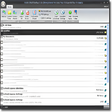
Enlarged image for RoboCrypt
RoboCrypt 0/1
  • Pros

    • Creates encrypted data backups
    • Supports local and network destinations
    • Utilizes freely available Windows tools
    • Can backup open data via VShadow
    • Includes backup completion email notifications
  • Cons

    • Requires an encrypted backup destination
    • Relies on multiple external tools

Used RoboCrypt for Windows?


Explore More


Full Specifications

GENERAL
Release
Latest update
Version
2.0
OPERATING SYSTEMS
Platform
Windows
Operating System
  • Windows 10
  • Windows XP
  • Windows Vista
  • Windows 8
  • Windows 2003
  • Windows 7
  • Windows Server
Additional Requirements
None
POPULARITY
Total Downloads
143
Downloads Last Week
0

Report Software

Program available in other languages


Last Updated


Developer’s Description

Create an encrypted data backup solution for local or network use.
RoboCrypt was designed to use freely available tools in Windows (TrueCrypt, Robocopy, VShadow, and PowerShell) to create an encrypted data backup solution for local or network use. The application requires the use of an encrypted backup destination to be able to backup from one or more sources of data either locally or remotely. Microsoft Volume Shadow Services can be used to backup open data where applicable and email notifications can be sent to notify someone of backup completion.

Download.com
Your review for RoboCrypt