Used PointandSee for Windows?


Editors’ Review

Download.com staff
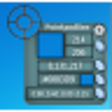
This utility captures on-screen colors by moving a finder window over any pixel. It provides precise selection with a magnifier and instantly displays the RGB and hexadecimal values for your target.
Enlarged image for PointandSee
PointandSee 0/1
  • Pros

    • Movable finder window for direct color sampling
    • Built-in magnifier aids precise pixel selection
    • Displays X and Y screen coordinate readouts
    • Provides RGB values for the selected pixel
    • Shows hexadecimal color code for any pixel
  • Cons

    • Does not provide HSL or CMYK color models
    • No feature to save colors or create palettes
    • Lacks a history of previously selected colors
    • Does not generate complementary color schemes
    • Limited to RGB and hexadecimal value outputs

Used PointandSee for Windows?


Explore More


Full Specifications

GENERAL
Release
Latest update
Version
1.4.2
OPERATING SYSTEMS
Platform
Windows
Operating System
  • Windows Vista
  • Windows XP
  • Windows 7
  • Windows 10
Additional Requirements
None
POPULARITY
Total Downloads
110
Downloads Last Week
2

Report Software

Program available in other languages


Last Updated


Developer’s Description

Include a cursor color picker for your Windows system.
PointandSee uses a different approach for color selection. Instead of moving a pointer to find the color, you move the whole of the PointandSee color finder over the color sample that you need to distinguish. Simply move the finder over the color that you need to distinguish. The inbuilt magnifier and X,Y readouts allows you to see in detail your selection and aids to pinpoint the exact pixels under the finder. The color under the finder is displayed in the Point Color box, at the same time R,G,B and Hexadecimal values for the selected pixel are shown.

Download.com
Your review for PointandSee