Used Ping Ya Face for Windows?
Ping Ya Face Analysis
AI Assisted Content ·
Not written by CNET Staff.
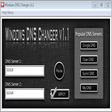
Ping Ya Face is a free utility designed for Windows users to perform network diagnostics and monitor connectivity. This application specializes in sending ping requests to various IP addresses or hostnames, allowing users to assess network performance and latency. With a straightforward interface, it caters to both novice and experienced users, providing essential insights into network stability.
Top Recommended Alternative
The key features of Ping Ya Face include customizable ping intervals, detailed response times, and the ability to log results for future reference. Users can easily configure settings to suit their specific needs, making it a versatile tool for troubleshooting network issues. Overall, Ping Ya Face serves as a practical solution for those seeking to enhance their understanding of network health and performance.
Used Ping Ya Face for Windows?
Explore More
Broadband Speed Test
Trial version
NetSpeeder
Free
Ethereal - Network Protocol Analyzer
Free
Network Monitoring Master
Trial versionScannet Pro
Trial version
Lepide User Management
Free
Lepide Event Log Manager
Free
Lepide DC Monitor
Free
PCFinder
Free
Bandwidth Monitor Pro
Trial versionProcessSearch
Trial version
Cobynsoft's AD Audit
Free