Used GetIcon for Windows?


Editors’ Review

Download.com staff
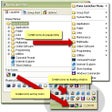
This application efficiently views and extracts icons from various binary file types, including DLL and EXE files. It supports saving icons as bitmap or icon files.
  • Pros

    • Views icons in binary files like DLL and EXE
    • Saves found icons to icon or bitmap files
    • Supports 32-bit full color with alpha blending
    • Handles icons used by Windows XP
  • Cons

    • No explicit mention of batch processing
    • No search functionality for icon content described
    • Limited file type support information

Used GetIcon for Windows?


Explore More


Full Specifications

GENERAL
Release
Latest update
Version
1.0.6
OPERATING SYSTEMS
Platform
Windows
Operating System
  • Windows 10
  • Windows XP
  • Windows 2000
Additional Requirements
None
POPULARITY
Total Downloads
4,806
Downloads Last Week
1

Report Software

Program available in other languages


Last Updated


User Reviews

5/5

1 User Votes


Developer’s Description

View and search icons among different file types.
This small application can view the icons that reside in binary files like DLL, EXE, and many other extension. Founded icon can be saved to properly to icon or bitmap file. Support 32bit full color with alpha blending icon used by Windows XP. Version 1. 0. 6 may include unspecified updates, enhancements, or bug fixes.

Download.com
Your review for GetIcon