Used Easy Print Envelopes for Windows?


Editors’ Review

Download.com staff
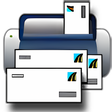
This application simplifies organizing contacts and printing professional envelopes. It supports bulk printing across various sizes and includes an integrated address book for easy selection. Direct email functionality is also provided.
Enlarged image for Easy Print Envelopes
Easy Print Envelopes 0/1
  • Pros

    • Prints professional envelopes quickly and easily.
    • Supports bulk printing for hundreds of envelopes.
    • Includes an easy-to-use contact address book.
    • Supports multiple address books.
    • Integrates with default email program for contacts.
  • Cons

    • Lacks contact import and export functionality.
    • Limited to three specific envelope sizes.
    • No options for custom envelope design.
    • Does not support printing labels.
    • No mention of address book cloud synchronization.

Used Easy Print Envelopes for Windows?


Explore More


Full Specifications

GENERAL
Release
Latest update
Version
2.0.0.7
OPERATING SYSTEMS
Platform
Windows
Operating System
  • Windows XP
  • Windows 8
  • Windows Vista
  • Windows 7
POPULARITY
Total Downloads
2,069
Downloads Last Week
0

Report Software

Program available in other languages


Last Updated


Developer’s Description

Organize your contacts and print professional looking envelopes.
Easy Print Envelopes is the quickest and easiest way to print professional-looking envelopes. It allows you to print tens and hundreds of envelopes of different addresses with one print. It came in three popular envelope sizes. Easy Print Envelopes has an easy to use address book that contains your contacts information. Printing an envelope is extremely easy. Just type in your contact information into the address book and select any contacts from your address book to print onto envelopes. It is very easy to add a new contact into the address book. You also have option to have multiple address books. In addition, you can also send e-mail to your contacts from the Easy Print Envelopes Interface. Just select your contact (single or multiple contacts) and then click on "E-mail", you default e-mail program will open with the "To" Filed filled with the contact's E-mail address.

Download.com
Your review for Easy Print Envelopes