Used ClocxCorelDrawMacros for Windows?


Editors’ Review

Download.com staff
This tool empowers users to design custom clock faces within CorelDraw 12. It offers a streamlined process through a variety of VB macros for automatic generation.
  • Pros

    • Draws and customizes clock faces
    • Utilizes VB Macros for automation
    • Features a single-form interface
    • Supports approximately 15 macro sets
  • Cons

    • Requires CorelDraw 12 installation
    • Limited to clock face design
    • Macro functionality may require user familiarity

Used ClocxCorelDrawMacros for Windows?

Explore More


Full Specifications

GENERAL
Release
Latest update
Version
1
OPERATING SYSTEMS
Platform
Windows
Operating System
  • Windows 2000
  • Windows XP
  • Windows 10
Additional Requirements
Windows 2000/XP, Clocx 1.5B, CorelDraw 12
POPULARITY
Total Downloads
15,899
Downloads Last Week
0

Report Software

Program available in other languages


Last Updated


Developer’s Description

Draw and customize clock faces using CorelDraw 12.
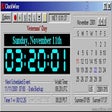
Here is a chance for you to draw your favorite clock-face (the clocx dial) customized to your preferences and style, using CorelDraw 12. You will be able to perform about 15 different sets of VB Macros from a single-form interface for drawing your ClockFace automatically.

Download.com
Your review for ClocxCorelDrawMacros