Used ACXtractor for Windows?


Editors’ Review

Download.com staff
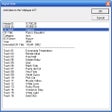
This audio-ripping app handles its basic job well enough but could use some polish, especially in terms of appearance. ACXtractor is not one of the better-looking rippers we've seen. The interface is bland, unattractive, and cluttered with several needless buttons and fields. The utility rips CD tracks into WAV, MP3, and OGG files. Clicking the Options menu item lets you change the bit rate and the codec. We were pleased with ACXtractor's ripping speed, which was faster than many other similar programs we've tested. This ripper also can access the online CDDB to retrieve track information and even includes a very modest audio player. If you're pressed for time and need a quick way to rip MP3s, this app is a good solution despite its totally uncompelling design.
Enlarged image for ACXtractor
ACXtractor 0/1

Used ACXtractor for Windows?


Explore More


Full Specifications

GENERAL
Release
Latest update
Version
3.20
OPERATING SYSTEMS
Platform
Windows
Operating System
  • Windows 98 SE
  • Windows XP
  • Windows NT
  • Windows 95
  • Windows 98
  • Windows 2000
  • Windows ME
POPULARITY
Total Downloads
35,431
Downloads Last Week
0

Report Software

Program available in other languages


Last Updated


User Reviews

4/5

4 User Votes


Developer’s Description

Extract your audio CDs, save them as WAVs or MP3s, and play them.

Download.com
Your review for ACXtractor