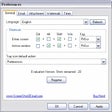
ScreenShot2Email for Windows
- By ScreenShot2
- Trial version
- User Rating
Used ScreenShot2Email for Windows?
Editors’ Review
Download.com staff
Pros
- Captures either the entire screen or just the active window.
- Initiates the capture and email process using user specified hotkeys.
- Automatically converts the screenshot to a necessary graphic format.
- Adds a specified watermark directly onto the captured image.
- Compatible with all standard mail client applications.
Cons
- Does not mention support for screen recording or video capture.
- Lacks integrated tools for image editing or annotations.
- The graphic formats supported for conversion are unspecified.
- Options for saving files locally without immediate emailing are not detailed.
ScreenShot2Email for Windows
- By ScreenShot2
- Trial version
- User Rating
Used ScreenShot2Email for Windows?
Explore More

Emailchemy (64-Bit)
Trial version
MemDB Email Filter
Trial version
Direct to Desktop Buzz
Trial version
Mammail
Free
OE Recovery Free
FreeEmail Confirmer
Trial versionSchedule Recurring Email for Microsoft Outlook
Trial versionMailQueen Pro for Windows
Trial versionInteliEmail
Trial versionGmailTrain
Paid
Gmail Growl
Free
Supernova E-mail finder
Trial version