Used Chess Wizard for Windows?
Editors’ Review
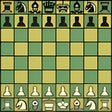
We've never been very good at chess, but that doesn't mean we can't recognize a good chess game when we see it, and Chess Wizard definitely fits that description. Although the game's graphics are nothing to get excited about, serious chess players will love its huge variety of features.
The game's interface is plain, with menus and a toolbar across the top and a one-dimensional chessboard. Chess Wizard has 10 levels of difficulty, ranging from "peabrain" to "overwhelming," and you can select from a variety of handicaps. We set our level at "novice"--we do sort of know what we're doing--and the game began. The computer made short work of us, but novice level didn't seem unreasonably difficult for someone who knows chess a little better than we do. Chess fans who like to share their games can publish them with Chess Wizard, at least theoretically; the program crashed when we tried to publish ours.
Chess Wizard has tons of features, and there's plenty of online documentation to go with them, but we did feel like many aspects of Chess Wizard are inaccessible to people who aren't very familiar with chess, and with electronic versions of chess in particular. Much of the documentation is written on the assumption that you already know a lot about the topic at hand. The FAQs will tell you, for example, how the program parses openings, but not what parsing openings actually means. Still, for the serious chess geek, Chess Wizard is a great choice.
Chess Wizard installs a desktop icon without asking but uninstalls cleanly.
What’s new in version 1.06
Used Chess Wizard for Windows?
Explore More

Classic Solitaire (Free) for Windows 10
Free
Hearts Card Game for Windows 10
Free
Battlefleet: Pacific War
Trial version
Monopoly
Trial version
Solitaire Collection X for Windows 10
Free
Draughts HD for Windows 10
Free
Teen Patti Live for Windows 10
Free
Free Spider Solitaire for Windows 10
Free
Arasan (64-bit)
Free
TriPeaks Solitaire for Windows 10
Free
3D Chess Game for Windows 10
Free
Free Chess
Free