Used Verbose Text to Speech for Windows?


Editors’ Review

Download.com staff
Verbose is a professional text-to-speech application that reads any computer text aloud and converts it to MP3 or WAV audio files for convenient listening.
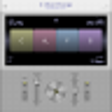
Enlarged image for Verbose Text to Speech
Verbose Text to Speech 0/6
  • Pros

    • Reads any text on your computer aloud.
    • Saves spoken text as MP3 or WAV files.
    • Supports hotkeys for efficient control.
    • Runs in the background without interrupting workflow.
  • Cons

    • No mention of voice variety options.
    • No indication of adjustable reading speed.
    • No support for cloud-based storage or syncing.

Used Verbose Text to Speech for Windows?


Explore More


Full Specifications

GENERAL
Release
Latest update
Version
2.01
OPERATING SYSTEMS
Platform
Windows
Operating System
  • Windows Vista
  • Windows XP
  • Windows 7
  • Windows Server
  • Windows 8
  • Windows 10
Additional Requirements
None
POPULARITY
Total Downloads
33,164
Downloads Last Week
2

Report Software

Program available in other languages


Last Updated


User Reviews

2/5

2 User Votes


Developer’s Description

Read any text on your computer and convert it to MP3.
This professional text to speech application is designed to assist in listening to text. Verbose can be used to read aloud any text, then save it as mp3 or wav files for future listening.

Typical Applications: Sit and relax while your PC reads the text to you. Save text to MP3 or wav. Proofread your own writing. Great for slow readers or people with a reading disability. Take some reading with you on your daily walk or run. Great tool to assist you study for exams. Listen to an eBook during your journey. Great for people with low vision or the elderly. Prepare for a big speech by hearing your words read aloud.

Features: Save as either Wav or MP3. Setup and use hotkeys for quicker and easier use. Runs in the background so you can still use your computer as normal.


Download.com
Your review for Verbose Text to Speech