Smaart for Windows
- By Eaw
- Trial version
- User Rating
Used Smaart for Windows?
Editors’ Review
Smaart Suite stands as the definitive flagship of the lineup, offering a comprehensive toolkit that feels like the natural, unrestricted evolution of v8. This multimedia application bridges the gap between complex acoustic theory and practical, on-site application for engineers who refuse to compromise on data accuracy.
Top Recommended Alternative

By integrating Smaart Suite’s Real-Time, Impulse Response, and SPL modes into a single cohesive interface, Rational Acoustics has created an environment where efficiency is paramount. Whether you are aligning a massive stadium array or monitoring levels at a local club, this software provides the granular control necessary for elite performance.
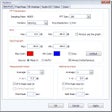
Smaart Suite’s Real-Time Mode remains the heartbeat of the program, delivering the dual-channel Transfer Function measurements that have become an industry requirement. This mode allows for instantaneous adjustments, helping engineers visualize frequency responses and phase relationships in high-stakes environments. The interface is snappy and intuitive, ensuring that you spend more time mixing and less time wrestling with configuration menus or hunting for hidden settings.
Modern acoustic measurement
The Impulse Response Mode offers an impressive array of time-domain visualizations. It provides essential calculations for RT60 and STI, which are vital for treating architectural spaces. However, the sheer depth of these features creates a steep learning curve for beginners. Without a solid foundation in acoustic physics, the density of the histograms and energy time curves can feel overwhelming, making the initial setup process quite daunting.
The SPL Mode rounds out the suite as a top-tier monitoring solution, perfect for logging and reporting to meet strict noise ordinances. While the traffic light meters and remote-viewing capabilities are fantastic for staying compliant, the hardware requirements for Class 1 certification add an extra layer of cost and logistical planning. Additionally, the resource-heavy nature of the full suite may push older laptops to their limits.
Pros
- Seamless integration of three distinct measurement modes
- Industry-standard Transfer Function for precise system alignment
- Comprehensive SPL logging and reporting for noise compliance
- Detailed acoustic calculations including RT60 and STIPA
Cons
- Significant learning curve for users new to acoustic analysis
Bottom Line
Ultimate investment
If you are looking for an all-in-one solution that offers zero functional limitations, Smaart Suite is the clear winner. It is a sophisticated, trustworthy companion that justifies its place in any pro audio kit. While the complexity and hardware needs require a bit of a breaking-in period, the depth of data and the reliability of the reporting tools are simply unmatched in the current market.
What’s new in version 6.0
- Modernized interface and workflow
- Performance and compatibility