Used Photo Cropper for Windows?
Editors’ Review
Photo Cropper is a basic image-cropping utility. We're not sure how a program could take a function as simple as cropping and make it so complicated, but Photo Cropper has succeeded in doing this.
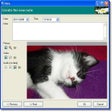
The program's interface is composed of three large boxes and makes no sense. We were immediately annoyed by the fact that dragging and dropping is the only way for users to get images into the program; there's no File menu. Once we opened an image, it was not immediately obvious how we were to go about cropping it. It turns out that clicking Edit or Add--it doesn't seem to matter which--opens a dialog box that allows users to adjust the crop settings. Here, users set where they want to crop the photo, as well as the scale and the mode (lossless or recompress). In this portion of the program, it seemed that when we clicked on the image to adjust the cropped area, the cursor inexplicably jumped to a portion of the screen not in use, making it impossible to crop the photo. We had successes in cropping once, but the other times were unsuccessful. The program's online Help file is extremely brief and unhelpful. Really, the program only does one thing, and it doesn't do it well.
Photo Cropper is free. It installs desktop icons without asking and leaves a folder behind upon removal. We do not recommend this program; there are too many other ways to crop photos that actually work.