Used M.M.D Multi.Map.Downloader for Windows?


Editors’ Review

Download.com staff
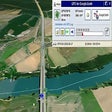
M.M.D Multi.Map.Downloader lets you download and store maps from Google, Bing, and OpenStreetMap on your PC. Easily select regions and zoom for detailed offline map access.
Enlarged image for M.M.D  Multi.Map.Download…
M.M.D Multi.Map.Downloader 0/4
  • Pros

    • Supports Google, Bing, and OpenStreetMap map sources
    • Downloads maps in various sizes
    • Easy region selection via mouse or manual coordinates
    • High zoom levels available
    • Includes address search functionality
  • Cons

    • Google perspective view is a testing version
    • Testing version does not display underlying map

Used M.M.D Multi.Map.Downloader for Windows?


Explore More


Full Specifications

GENERAL
Release
Latest update
Version
1.0
OPERATING SYSTEMS
Platform
Windows
Operating System
  • Windows 10
  • Windows XP
  • Windows Vista
  • Windows 8
  • Windows 2000
  • Windows 7
Additional Requirements
None
POPULARITY
Total Downloads
8,140
Downloads Last Week
32

Report Software

Program available in other languages


Last Updated


Developer’s Description

Load maps in any size from Google/Bing/OSM and store them on your PC.
M.M.D Multi.Map.Downloader loads maps in any size from google/bing/OSM and stores them on your PC.All map formats from google and bing are supported, also a testing version of the perspective view from google maps, and also maps from OpenStreetMap.Usage is easy, just select a region with the mouse using the right MB, and the program zooms this region up - or enter the window's coordinates manually (or copy them from google/bing). Zoom your region up to the maximum level the provider allows (google 20, bing 19, OSM 18) and you'll get the much detail as possible/necessary.Oversized views can be scrolled by dragging the view with the left mose button.Included is also a powerful back-function, which holds the previous images in memory for fast zooming. An overview-window of all previes views lets you select the last view of your wish.Adress-search is also possible, and when there are more then 1 result, a selection window lets you comfortable select the desired location.Even the perspective view from google sattelite is implemented, but at this point in a test-version, which does not display an underlying map.Just try it out - I think it'll makey you a bit happy and you can overlook the little weaknesses.All used names, trademarks and graphics are property of their respective owners.

Download.com
Your review for M.M.D Multi.Map.Downloader