Used KbdKaz 500 for Windows?


Editors’ Review

Download.com staff
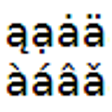
KbdKaz 500 offers a multilanguage keyboard layout providing access to over 500 additional characters and symbols, seamlessly integrating with your existing US layout.
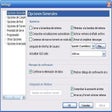
Enlarged image for KbdKaz 500
KbdKaz 500 0/1
  • Pros

    • Provides access to approximately 500 additional characters and symbols.
    • Coexists with standard character entry methods.
    • Compatible with existing US keyboard layouts.
    • Maps extra 102 key on laptops to the left Shift key.
  • Cons

    No Cons available


Used KbdKaz 500 for Windows?


Explore More


Full Specifications

GENERAL
Release
Latest update
Version
1.3
OPERATING SYSTEMS
Platform
Windows
Operating System
  • Windows 2003
  • Windows Vista
  • Windows 7
  • Windows XP
  • Windows 2000
  • Windows 8
  • Windows 10
  • Windows Server
Additional Requirements
None
POPULARITY
Total Downloads
169
Downloads Last Week
0

Report Software

Program available in other languages


Last Updated


Developer’s Description

Add multilanguage keyboard layout compatible with US layout labels.
KbdKaz 500 keyboard layout lets you enter about 500 additional letters and symbols, which are inaccesible in normal keyboard layouts. You can use KbdKaz 500 in your everyday work, it coexist with standard way of entering characters. If you already use US keyboard layout, just install KbdKaz 500 and set it as the default layout. Use your keyboard as usual, and whenever you want extra characters or symbols, use advanced features of KbdKaz 500. In addition, the program maps extra 102 key on laptops to left Shift key.

Download.com
Your review for KbdKaz 500