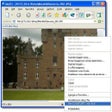
Used IExif for Windows?
Editors’ Review
Download.com staff
Top Recommended Alternative

Pros
- Integrates directly into Internet Explorer as an add-on
- Automatically detects digital camera photos on web pages
- Displays EXIF data on mouse hover using native tooltips
- Extracts embedded metadata from online images
- Offered as a completely free tool
Cons
- Exclusively compatible with the Internet Explorer browser
- Officially supports only Internet Explorer versions 7 through 10
- Functionality is limited to viewing EXIF data only
- Lacks any user-configurable settings or options
Explore More

Google Chrome about:memory/Task manager
FreeWebsBee
Free
FileDoggy Updater
FreeWebShadow for Mozilla Firefox
FreeSuggestive Internet Search
FreeVMS Easy Merchant Support
FreeDataFox
FreeTamil Google Logo
Free
Press Release Submitter Enterprise Edition
Trial version
Play The Web 2010SE
Trial versionFeed Viewer
Freeheadr FireFox toolbar
Free











