Used EDS Audio Converter for Windows?


Editors’ Review

Download.com staff
Convert audio files between popular formats and extract sound from video. This free utility supports batch processing, offers built-in presets, and provides detailed control over output settings like bit rate and sample rate.
  • Pros

    • Converts between eight common audio formats
    • Extracts audio from a wide range of video files
    • Supports batch processing for multiple files at once
    • Allows editing of sample rate, bit rate, and channels
    • Merges multiple audio files into a single item
  • Cons

    No Cons available


Used EDS Audio Converter for Windows?


Explore More


Full Specifications

GENERAL
Release
Latest update
Version
1.0.7.7
OPERATING SYSTEMS
Platform
Windows
Operating System
  • Windows Vista
  • Windows 7
  • Windows 10
  • Windows XP
  • Windows 8
Additional Requirements
None
POPULARITY
Total Downloads
126
Downloads Last Week
9

Report Software

Program available in other languages


Last Updated


Developer’s Description

Convert audio files between different formats.
EDS Audio Converter includes ready presets to convert audio. Convert MP3, WMA, WAV, M4A, AMR, OGG, FLAC, MP2 completely free.Select and convert audio from your video files. Supports DVD, MPEG, MP4, AVI, DIVX, MOV, WMV, VOB, 3GP, RM, QT, FLV video formats.The interface is user-friendly, consisting of a regular window with an organized structure, where you can add files with the help of the file browser or folder view. As you may have suspected, batch processing is supported, which means you can work with multiple items at once to reduce overall task duration.

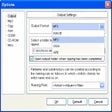
Apart from selecting the output format and directory, you can select a preset profile or edit audio settings when it comes to sample rate and size, bit rate, and channel mode.EDS Audio Converter also integrates an option for merging all sound files into a single item, as well as for previewing them in a built-in player.


Download.com
Your review for EDS Audio Converter