Used Destroy Watch Face for Android?


Destroy Watch Face Analysis

AI Assisted Content ·

Not written by CNET Staff.

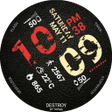
Destroy Watch Face is an Android application designed to enhance the personalization of your Wear OS smartwatch. This versatile app enables users to select from various design colors and includes features such as a secondary timezone display, battery life monitoring, and health tracking capabilities including heartbeat frequency and daily step count. Additionally, it provides notifications for unread SMS, emails from Gmail, and missed calls, making it a comprehensive tool for managing daily communications and health metrics.

The application offers both free and premium features. The free version allows users to customize design colors, set heartbeat and weather refresh rates, and select card styles. In contrast, premium options provide advanced functionalities like custom titles, switching between different display modes, and detailed widget interactions. The installation process is straightforward, with settings accessible through the Wear OS app on your mobile device, ensuring a user-friendly experience.

Enlarged image for Destroy Watch Face
Destroy Watch Face 0/3

Used Destroy Watch Face for Android?


Explore More

Full Specifications

GENERAL
Release
Latest update
Version
1.26.01.1419
OPERATING SYSTEMS
Platform
Android
Operating System
Android 15.0
POPULARITY
Total Downloads
6
Downloads Last Week
0

Report Software

Program available in other languages


Last Updated


Developer’s Description

NOT FOR SAMSUNG GEAR S2 / GEAR S3 / GALAXY WATCH .. (running Tizen OS) If you have one, do not install this application.

NOT FOR SAMSUNG GEAR S2 / GEAR S3 / GALAXY WATCH !! (running Tizen OS)

If you have one, do not install this application.

To find support and compatible applications with your watch, please go to http://www.themaapps.com/watch_on_tizen_os

Features of Destroy Watch Face

- Clock Widget (No second hand due to battery consumption)

- Choose design colors

- Define a secondary timezone for digital display

- Day & Month

- Watch battery

- Mobile battery

- Weather

- Daily step count

- Heartbeat frequency

- Unread SMS

- Unread Email from Gmail

- Missed calls

- Presets

- Complication (wear 2.0)

The settings of the watch face are located in the "Wear OS" app of your mobile.

Just hit the gear icon over the watch face preview and the settings screen will show up!

FREE Settings

- Choose design colors on watch & mobile

- Define heartbeat frequency refresh rate

- Define weather refresh rate

- Weather unit

- 12 / 24 hours mode

- Define interactive mode duration

- Choose to switch between small/big/translucent/opaque cards

- Choose the ambient mode b&w and eco luminosity

- Choose between 2 weather providers (Yr & OpenWeatherMap)

- Choose to display a leading zero on hours

- Display brand name or not

- Choose to display or not the seconds dots

PREMIUM Settings

- Choose your own title in place of "DESTROY"

- Switch between co / simple b&w / full ambient mode

- Choose background among different styles

- Blend background with colors

- Define a secondary timezone for digital display

- Data:

+ Change the indicator to display on the 3 positions

+ Choose between up to 8 indicators

+ Complication (wear 2.0)

- Interactivity

+ Access to detailed data by touching a widget

+ Switch the displayed data by touching a widget

+ Change the shortcut to execute on the 4 positions

+ Choose your shortcut among all applications installed on your watch!

+ Choose to display the interactive areas

- Presets manager:

+ Save your preset with all its options (colors, backgrounds, data, features. EVERYTHING is saved!)

+ Load / delete one of your previously saved preset

+ Share / Import presets

- Define manual or automatic location

Installation

Watch Face

Wear OS 1.X

This watch face will be installed automatically from your phone paired.

If it doesn't show up please go to the Wear OS App > Settings and Resync all apps.

Wear OS 2.X

A notification will be displayed on your watch, right after your mobile installation. You just have to hit it to start the installation process of the watch face.

If the notification did not display for some reason, you can still install the watch face by using the Google Play Store available on your watch: just search the watch face by its name.

Mobile clock widget

Just long press on your launcher, then select the application widget to drop it on your home screen of your mobile.

Customize the widget settings with the application.

More watch faces

Visit my watch faces collection for Wear OS on the Play Store at https://goo.gl/CRzXbS

** If you have any issues or questions, fill free to contact me by email (English or French language) before giving a bad rating. Thanks!

Website: http://www.themaapps.com/

Youtube: https://youtube.com/ThomasHemetri

Twitter: https://twitter.com/ThomasHemetri

G+: https://plus.google.com/+ThomasHemetri

Instagram: https://www.instagram.com/thema_watchfaces


Download.com
Your review for Destroy Watch Face
Download.com

AI Assisted Content Disclosure

Content created and reviewed by Softonic with information obtained from thema, using AI.

CNET's editorial team was not involved in the creation of this content. Opinions, analysis and reviews were not provided by CNET.