Used Clock G2 Freeware Edition for Windows?


Editors’ Review

Download.com staff
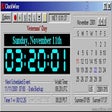
Clock G2 Freeware automatically syncs your PC clock with atomic time servers. It offers a customizable desktop clock with various display and transparency options.
  • Pros

    • Automatically synchronizes PC clock with atomic time servers
    • Offers analog and digital clock displays
    • Includes six pre-installed clock skins
    • Supports showing seconds and date
    • Features transparent mode and always on top
  • Cons

    • Freeware edition may have limitations
    • Skin customization options are limited to pre-installed
    • No mention of advanced synchronization settings
    • Functionality focused solely on clock synchronization and display

Used Clock G2 Freeware Edition for Windows?


Explore More


Full Specifications

GENERAL
Release
Latest update
Version
5.1
OPERATING SYSTEMS
Platform
Windows
Operating System
  • Windows 10
  • Windows XP
  • Windows 95
  • Windows 2000
  • Windows 98
  • Windows NT
  • Windows ME
Additional Requirements
Windows 95/98/Me/NT/2000/XP
POPULARITY
Total Downloads
28,780
Downloads Last Week
0

Report Software

Program available in other languages


Last Updated


User Reviews

3.8/5

8 User Votes


Developer’s Description

Synchronize your PC clock automatically with popular Internet Atomic time servers.
From the developer: "Clock G2 Freeware Edition is a PC clock synchronizer and desktop clock. Synchronize your PC clock automatically with popular Internet Atomic time servers. Desktop display options include analog and digital, with six pre-installed skins. You can show seconds, show date, or change to Transparent mode. Clock G2 also has an Always on Top mode, and a Send to Back mode."

Download.com
Your review for Clock G2 Freeware Edition