Used Brightness Slider for Mac?


Brightness Slider Analysis

AI Assisted Content ·

Not written by CNET Staff.

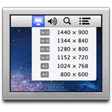
Brightness Slider is a free utility for Mac users that provides a simple and effective way to control screen brightness. This application allows users to adjust the brightness of their displays with a slider, offering greater precision than traditional system controls. It integrates seamlessly into the Mac interface, enabling quick adjustments without navigating through multiple settings.

Top Recommended Alternative

The program features a straightforward design that caters to both novice and experienced users. Brightness Slider operates in the menu bar, allowing users to access brightness settings instantly. In addition to manual adjustments, it supports keyboard shortcuts for increased convenience. The utility is lightweight and does not consume significant system resources, making it ideal for users looking to enhance their viewing experience without the clutter of more complex applications.

Enlarged image for Brightness Slider
Brightness Slider 0/2

Used Brightness Slider for Mac?


Explore More


Full Specifications

GENERAL
Release
Latest update
Version
1.2.6
OPERATING SYSTEMS
Platform
Mac
Operating System
Mac OS X
Additional Requirements
OS X 10.8 or later, 64-bit processor
POPULARITY
Total Downloads
33
Downloads Last Week
0

Report Software

Program available in other languages


Last Updated


Developer’s Description

With Brightness Slider you can adjust screen brightness from the menu...

With Brightness Slider you can adjust screen brightness from the menu

bar, just like the sound menu provided by Apple, and with improved

control over the dimming process.

Using a keyboard with no brightness keys? Tired of low brightness

levels which are still too bright? Brightness Slider gives you total

control over your screen's brightness settings, allowing in

particular for a really smooth transition between low light and total

darkness.

Features:

- Screen brightness level adjustment right from the menu bar

- Dimming control at low brightness levels

- Arrow key function with active Brightness Slider menu

- Custom hotkeys for lowering and raising brightness levels

- Start at login option available in the preferences

How Brightness Slider works:

Brightness Slider darkens your display by combining two separate

methods. Method A adjusts the real backlight intensity of your

display and method B creates a semi-transparent black veil above

everything else. Why the complexity? Well, when dimming a display,

the final jump down to no backlight at all is very large, especially

in a darkened room. To provide more control over the dimming process,

the top-half of the slider controls the backlight intensity from 1

down to 0.1 (method A). Then, the bottom-half controls the opacity of

the semi-transparent veil, whilst keeping the backlight at 0.1

(method B). When the slider is at zero, the backlight is turned off.

The result is that the final jump now has several intermediate steps,

which means the perceived brightness (the combined result of both

methods) is that much more adjustable.

One last thing:

There are displays where Brightness Slider cannot control backlight

intensity. However, it can still perceptually dim the screen by

controlling the opacity of the semi-transparent veil (which can be

created on any display).

Any comments or suggestions, don't hesitate: act.prods@gmail.com


Download.com
Your review for Brightness Slider
Download.com

AI Assisted Content Disclosure

Content created and reviewed by Softonic with information obtained from ACT Productions, using AI.

CNET's editorial team was not involved in the creation of this content. Opinions, analysis and reviews were not provided by CNET.