Used Acme Photo ScreenSaver Maker for Windows?
Editors’ Review
Acme Photo Screensaver Maker provides users with an excellent tool for creating a personalized screensaver. With simple commands and great results, this is a download everyone can enjoy.
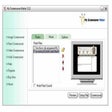
The program's interface is so simple that users will most likely not need to take a trip to the Help file and Guide. With large command icons and an intuitive flow to input data, customizing your screensaver could not be easier. Users can choose individual photos to input or select entire folders with the program's photo tool that operates using addition and subtraction symbols in tandem with a file tree. From there, users can add music utilizing a similar tool. Next, users can choose from a long list of transitions to jump from one shot to the next. In addition, there are several options to add text to the screensaver. Users can input a simple opening and closing credit by entering the desired message, and users can also input headlines and captions using the same way. The results are crisp, smooth screensavers with a professional appearance. The program is light on features, but is not really missing anything. One of the bonuses that we didn't really find necessary was an option for downloading song lyrics into the screensaver, much like you did the photos and music.
With a surprising collection of simple commands and great results, the only complaint users may have is this program's paltry seven-photo limit during the trial. Still, anyone looking to make personal screensavers should try Acme Photo.
Used Acme Photo ScreenSaver Maker for Windows?
Explore More

Marine Aquarium Time
Trial version
Clock Mechanism Screensaver
Free
Wit and Wisdom
Trial version
Wellwasser Bluescreen
FreeGLT Chaos Screen Saver
FreeThe Free Monty
Trial versionHuman-Orbs
Free
NfoNak
FreeBritney Spears Screensaver
Trial versionScreenshotX
Free
3D Rain Forest Adventure
Trial versionBass Fishing Scenes
Trial version