CNET Editors' review
Whereas people used to--and often still do--cover their desks with sticky notes, it's now possible to put virtual sticky notes on your computer's desktop as well. Efficient Sticky Notes is an easy way to post reminders to yourself where you're sure to see them.
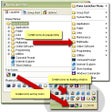
Efficient Sticky Note's interface is attractive and intuitive, reminding us quite a bit of Microsoft Outlook. Previews of the notes are displayed in an upper pane, while a lower pane shows the full body of a selected note. Users can choose whether or not they want each note to appear on the desktop, making the program useful for keeping notes that you don't necessarily need immediately. We liked that the program lets users change the background color and opacity of the sticky notes, and it's also quite handy that users can attach files to notes. We do wish that the program had a better way for handling lengthy notes, though. The sticky notes display the entire text of the note, which can get quite unwieldy if a note is more than a couple sentences long. An option to cut the note off after a certain number of characters or words would be most welcome; users could then, as they can now, click on the note to view the entire contents. Efficient Sticky Notes comes with a Help file that is well-written and thorough. Overall, this program didn't knock our socks off, but it's not a bad choice for users seeking a simple sticky note utility.
Efficient Sticky Note installs and uninstalls without issues. We recommend this program to all users.
Publisher's Description
From EfficientSoftware.net:
With Efficient Sticky Notes you can read information at any time on your desktop. It saves your money and saves your time. The software allows various background colors, with optional gradient effect, to be set for the sticky notes. You can also customize the font of each note and set it to be semi-transparent so it will not fully cover up your desktop background or icons. To fully protect your privacy, the software encrypts the login password with the irreversible SHA algorithm and also encrypts data files. Besides, it offers various special features such as managing sticky notes by group, setting note importance, tracking the creation time and last modification time of notes, adding attachments to notes, and Recycle Bin.
More Products to Consider
- Stick your notes on desktop to read them at any time.Download
Installed
Smart Install - Create and organize sticky notes and reminders on your desktop.Download
Installed
Smart Install - Stick virtual notes on your screen.Download
Installed
Smart Install - Create and stick different notes and manage them on your Window...Download
Installed
Smart Install - Create and stick electronic notes on your Windows desktop.Download
Installed
Smart Install - Bring back the Windows "Start" menu to Windows 8.Download
Installed
Smart Install - Return the Windows 7 style Start menu to Windows 8.Download
Installed
Smart Install - Create multiple alerts which can alert you at a specific moment...Download
Installed
Smart Install - Enable clock with countdown, reminder, stopwatch, and desktop s...Download
Installed
Smart Install - Place favorite Web links, program shortcuts, and widgets on a f...Download
Installed
Smart Install - Create and post reminder notes on your desktop.Download
Installed
Smart Install - Clean up icon clutter on your desktop.Download
Installed
Smart Install - Set unlimited numbers of alarm clocks on Windows.Download
Installed
Smart Install - Control the size, position, and layering of windows on your des...Download
Installed
Smart Install - Manage your daily activities by putting virtual reminders on de...Download
Installed
Smart Install - Arrange windows easily on multiple monitors.Download
Installed
Smart Install - Get dock with live icon reflections and speed up access to your...Download
Installed
Smart Install - Set your alarm clock and replace your standard tray clock using...Download
Installed
Smart Install - Enter word in diary to find corresponding entries.Download
Installed
Smart Install - Enhance your desktop with different widgets.Download
Installed
Smart Install - Access and use most commonly used programs.Download
Installed
Smart Install - Record Web site login passwords, software registration codes, a...Download
Installed
Smart Install - Keep clipped text archived on the Clipboard.Download
Installed
Smart Install - Customize the look and feel of the Windows user interface.Download
Installed
Smart Install
-
All versions:
3.0 starsout of 6 votes
-
Current version:
0 stars Be the first to review this product -
My rating:
Write review
Results 1-6 of 6
-
"Can't uninstall the program; now it's frozen"
Version: Efficient Sticky Notes 3.10 Build 327
Pros
It works: you can put a lot of notes on your desktop, even fade them out so that they barely show. I had work reminders, personal reminders, phone numbers I was going to need rather than have to look them up, notes about things I needed to do to help my aging mother, such as shopping lists . . . The usage went on and on. That is exactly what I wanted and needed, enough so that I went to their website to see what other products they have.
Cons
- Choosing the color and font is difficult. And when dealing with a note already written changing the color of a note changes the font. You need to go back to the note and redo them.
- It has frozen
- I can't uninstall it - at least I haven't found a way to yet.
- See above: before it froze I took a look at their website to see what other products they might have. Although not particularly sensitive there is no way that I'd support these people.Summary
It works exactly as described (although changing the color of notes and fonts is more difficult than it should be) and as such I would have rated it at about four stars. That would drop to three or two because you can't install it - at least I haven't found a way yet. Meanwhile it has frozen which further dropped the rating.
Correction: "Efficient Reminder is a handy calendar and reminder software program. With her help, you will be able to catch up with your meetings, amaze your girl when dating her, pay each month's bills in time and prepare for your mom's birthday in time."
But what really tanked the rating wasn't the software, it was the developer; their view of what men and women do is from the '50. The mildest is the description of another product "Impress your girl!" by actually remembering a date. Clearly men can't do this without help. Descriptions of products for women - the main change is that they're pink - includes reminders to pick up dry cleaning, play dates, and other 'housewife' chores. Which is fine. But I was really looking at their products because I'm working on a number of complicated professional projects
Updated on Feb 10, 2013 -
"Very good program for reminder all. Stickies ondesktop"
Version: Efficient Sticky Notes 3.0 Build 320
Pros
Easy to install, easy to use.
Many free for use.
Personalization and more.
Posted up in the right corner (but we cam move on desktop hereever and stayed there until I need. It deleted easily and new notes are easy to set up.
Read more: Efficient Sticky Notes - Download.com http://download.cnet.com/Efficient-Sticky-Notes/3000-2072_4-10910953.html#ixzz1rRQfFDXSCons
No con for me at this moment.
Summary
Easy it is for all users an I strongly recommand this produt.
-
"Great for desktop reminders"
Version: Efficient Sticky Notes 3.0 Build 317
Pros
Posted up in the right corner and stayed until no longer needed. It deleted easily and new notes are easy to set up.
Cons
No cons at this time.
Summary
I needed an easy reminder setup as aging does take its toll on memory. This works really great for me.
-
"Have not used it much yet."
Version: Efficient Sticky Notes 3.0 Build 317
Pros
Easy to install. Seems easy to use.
Cons
Had a little trouble figuring out how to get it to show up on top of everything.
-
"Great Idea .....and The Price Is Right"
Version: Efficient Sticky Notes 3.0 Build 317
Pros
Downloaded, Installed & Runs Beautifully. This being the first day of owning it, I'd have to say ...so far so good.
Cons
As Of Now.......None
Summary
Good Idea......Easy Install and Set Up with lots of ways to personalize your experience.
-
"Never worked!"
Version: Efficient Sticky Notes 1.66 build 91
Pros
Nothing at all
Cons
Everything
Summary
It never worked on my computer. I don't have time to try to reinstall!