Used XWidget Pro for Android?


XWidget Pro Analysis

AI Assisted Content ·

Not written by CNET Staff.

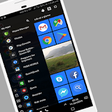
XWidget Pro is a full-featured application designed for Android devices, specifically in the personalization category. This app allows users to create and customize dynamic widgets, providing a unique and interactive experience on their home screens. With support for various themes and styles, it enables users to tailor the appearance of their devices to match personal preferences. The app also includes a variety of pre-made widgets that can be easily adjusted to fit individual needs.

Top Recommended Alternative

Compatible with Android 9.0 and above, XWidget Pro offers a user-friendly interface that simplifies the process of widget creation. The latest version, V1.94, supports multiple languages, including English, Spanish, and German. Users can benefit from the versatility of the app, which not only enhances the aesthetic appeal of their devices but also improves functionality by allowing quick access to essential information and applications through customizable widgets.

Enlarged image for XWidget Pro
XWidget Pro 0/4

Used XWidget Pro for Android?


Explore More


Full Specifications

GENERAL
Release
Latest update
Version
1.97
OPERATING SYSTEMS
Platform
Android
Operating System
Android 9.0
POPULARITY
Total Downloads
494
Downloads Last Week
3

Report Software

Program available in other languages


Last Updated


Developer’s Description

XWIDGET PRO VERSION EXTRA FEATURES: Access to the whole online gallery and Unlimited download (more than 1800 widgets and counting.).

XWIDGET PRO VERSION EXTRA FEATURES:

- Access to the whole online gallery and Unlimited download (more than 1800 widgets and counting..)

- More CORES supported like cpu, ram, calendar, photo album etc ported from the XWidget pc version (future updates)

- Extra Weather detailed information screen

- No any Ads Banner

TRY XWIDGET FREE VERSION:

https://play.google.com/store/apps/details?id=com.xwidgetsoft.xwidget

------------------------------------

XWidget is the Android version of the famous Free desktop customization platform "XWidget" for Windows. A very lightweight and highly customizable widget engine with powerful visual widget editor.

Please support us to continue the development of our application and provide more cool widgets for you!

-----------------------------------------------

[Feature]

1. Provides a new way to DIY widgets for Android.

2. Cross-platform widget: the widget you create on PC can run both on Windows and Android platform.

More than 1600 widgets created for PC can be used on your Android device or Tablet! You can search on the official XWidget or on DeviantART.

http://android.xwidget.com/

or

http://deviantart.com/?order=5&q=xwidget

3. All the widgets can be resized on Android 4.0+,otherwise you need custom launchers that support this function like ADW, Apex, GO Launcher, Nova etc.

4. Visualization widget designer for Windows PC: you can create your own widgets with XWidgetDesigner for Windows,and One-key to send the widget to your Android Device to preview or run.

5. Supports hotspots.

6. Runs on devices with old OS, Android 2.1+

7. Few resources taken: running the widget only needs 6-12M RAM, not using the CPU in peacetime.

8. Very lightweight and Battery Friendly: Do not run any code or action after lock screen , has no effect to the lifetime of the battery.

9. Online widget gallery: One-touch to download and install widgets from online gallery. Large number of widgets in online gallery, updated daily.

Long press to delete the widget.

10. Accuweather.com weather service for the weather widgets with up to 15 days forecast.

11. All the widgets use the original file extension ".xwp" of XWidget.

NO EXTRA ".apk" files are installed in your phone.

12. Requires only a few Permissions : only needs to write in external storage and access network Permissions.

Without any residual background services and processes: When closing the widget it will completely exit without any permanent backstage to slow down the system.

[Available sizes]

1x1, 1x2, 1x4, 1x5, 2x1, 2x2, 2x4, 3x1, 3x2, 3x3, 3x4, 4x1, 4x2, 4x3, 4x4, 5x1, 5x2.

[Permissions explained]

write external storage - to save and load widgets.

accsess network state - for weather data and download widget from gallery.

[Tutorials]

How install widgets on Android phones: http://bbs.xwidget.com/viewtopic.php?f=18&t=3776

Application's settings,modes,menus: http://bbs.xwidget.com/viewforum.php?f=23

[Translator]

Geman by Dagedee

Hungarian by Szabo Istvan

If you can help to translate,please download this english language file: http://sdrv.ms/1eZcXmW

[Special Thanks]

Jimking,Slavoo,QianCang,Digigamer,Yereverluvinuncleber.

[Note]

Do not use any "Kill processes" or "Release memory" app to kill the XWidget's process , Doing this will cause the clock widgets stop update. Or You can add XWidget to the ignore list .

If your clock/weather widget stop update, please allow XWidget Auto-Start in Android Settings>Permissions


Download.com
Your review for XWidget Pro
Download.com

AI Assisted Content Disclosure

Content created and reviewed by Softonic with information obtained from XWidgetSoft, using AI.

CNET's editorial team was not involved in the creation of this content. Opinions, analysis and reviews were not provided by CNET.