Used Terminal Watch Face for Android?
Terminal Watch Face Analysis
AI Assisted Content ·
Not written by CNET Staff.
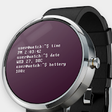
Terminal Watch Face is a personalization application designed for Android devices, allowing users to customize their smartwatch interfaces. It features a sleek, terminal-style display that showcases time, date, and other customizable widgets. Users can choose from various themes and color schemes, offering a unique aesthetic that caters to different preferences. Compatibility with various Android smartwatches enhances its versatility, making it suitable for a wide range of users.
Top Recommended Alternative
In addition to its visual appeal, Terminal Watch Face provides users with a user-friendly interface for easy customization. The app supports interactive elements, allowing users to tap on the watch face to access different functions or applications. It also includes battery-saving options to ensure that the watch face does not drain the device's battery quickly. Overall, Terminal Watch Face combines functionality and style, making it a noteworthy option for those looking to personalize their smartwatch experience.
Used Terminal Watch Face for Android?
Explore More

Hot Video for Tik Tok and Social Media
Free
Classic Black Emoji Keyboard
Free
Beautiful SMS Keyboard Themes 2018
Free
Aurora Theme for LG G6 G5 V30 V20 G4 G3 G2 V10 K10
Paid
4K Live Wallpapers
Free
Bluegrass Ringtones
Free
Katseye Wallpapers Story
Free
Cars Live Wallpaper
Free
Spider-Man: Far From Home Themes & Live Wallpapers
Free
3310 Old Phone Nokia Ringtones - Ringtone Maker
Free
Remix Theme for LG V20 & LG G5
Paid
Informative Digital Weather A4
Paid











