Used Terminal Green - CRT Theme (Pro Version) for Android?
Terminal Green - CRT Theme (Pro Version) Analysis
AI Assisted Content ·
Not written by CNET Staff.
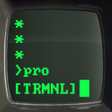
Terminal Green - CRT Theme (Pro Version) is a unique Android application designed for users who appreciate retro aesthetics. This fully customizable theme mimics the look of vintage computer terminals, allowing users to revamp their device's appearance. The application features an extensive collection of icons and fonts that can be tailored to individual preferences, ensuring a personalized experience. Beyond just icons, it offers a cohesive theme that transforms the overall interface of the Android system, enhancing visual appeal and functionality.
Top Recommended Alternative
In addition to its aesthetic enhancements, Terminal Green provides a user-friendly interface for customization. Users can easily navigate through the options to change icons and fonts, creating a distinctive look that reflects their style. The theme is compatible with a variety of Android devices, making it accessible to a wide range of users. Overall, Terminal Green stands out as a compelling choice for anyone looking to add a nostalgic touch to their mobile experience.
Used Terminal Green - CRT Theme (Pro Version) for Android?
Explore More

3D Parallax Background
Paid
Knight GO LAUNCHER THEME
Free
3D Image Live Wallpaper
Paid
Mahjong Match - Slide Puzzle
Free
Photo Widget-7
Free
Psychedelic Live Wallpaper
Free
Nature Trio: Relax Launcher
Free
أخصائي الصحة العامة
Free
Unicorn GO Launcher Theme
Free
Funky WallpaperHD Background
Free
Neon Love Theme
Free
Matrix Live Wallpaper
Free