Used Storm Prediction Center Widget for Android?


Storm Prediction Center Widget Analysis

AI Assisted Content ·

Not written by CNET Staff.

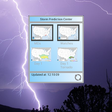
The Storm Prediction Center Widget is a full version Android application designed to provide users with real-time weather alerts and forecasts. This utility focuses on severe weather conditions, offering timely notifications about storms, tornadoes, and other significant weather events. Users can customize alerts based on their location, ensuring that they receive pertinent information tailored to their specific needs.

Top Recommended Alternative

In addition to alerts, the application features detailed graphical representations of weather data, including radar imagery and forecast maps. The user interface is designed for ease of navigation, allowing users to access vital information quickly. This application serves as a valuable tool for anyone interested in staying informed about severe weather patterns and making data-driven decisions in response to changing weather conditions.

Enlarged image for Storm Prediction Center W…
Storm Prediction Center Widget 0/8

Used Storm Prediction Center Widget for Android?


Explore More


Full Specifications

GENERAL
Release
Latest update
Version
1.6
OPERATING SYSTEMS
Platform
Android
Additional Requirements
None
POPULARITY
Total Downloads
15
Downloads Last Week
0

Report Software

Program available in other languages


Last Updated


Developer’s Description

The only app that puts the Storm Prediction Center outlooks on your home screen.
Keep up to date with the latest Severe Weather Outlooks from the Storm Prediction Center. See the latest Mesoscale Discussions, Watches, Day 1, 2, 3, 4 - 8 Day Outlooks and Storm Reports at a glance on this Home Screen Widget. Press on any image to go the SPC webpage for more details. Settings include options to update every 15 minutes, 30 minutes, every hour, twice a day or once a day. Hit the Refresh button on the widget at anytime to see an instant update of the most current information. Play a sound at every update (veteran chasers will recognize this sound. ) or uncheck sounds. Instructions for install: 1) Go to your apps button (On KitKat and greater after long press on the homescreen you'll see widgets at the bottom of the screen. ) 2) Select the Widgets tab. Long press on the SPC Widget (light blue background). 3) Drag to the area you want it on your homescreen. 4) See the config screen and choose your settings for update frequency and sounds. 5) Save and then see it on the screen. 6) Long press again to resize. 7) Long press and move to trash can to delete. 8) Repeat 1) - 6) to add again. To reconfigure: To get back to the config screen you have to delete your widget from the screen by dragging it to the trashcan then install a new one. Then you will see the config screen again and can set a new update time or disable the sound on the new one. (c) 2014 Apexice All Rights Reserved.

Download.com
Your review for Storm Prediction Center Widget
Download.com

AI Assisted Content Disclosure

Content created and reviewed by Softonic with information obtained from APEXICE, using AI.

CNET's editorial team was not involved in the creation of this content. Opinions, analysis and reviews were not provided by CNET.