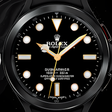
Used Rolex Royal Watch unofficial for Android?
Rolex Royal Watch unofficial Analysis
AI Assisted Content ·
Not written by CNET Staff.
Rolex Royal Watch unofficial is a comprehensive application designed for Android users who wish to enhance their Wear OS experience with elegant watch faces. This program features an extensive collection of 43 different watch models, including iconic designs such as Daytona, Oyster Perpetual, Submariner, Explorer, and Geneve Cellini. Each model is customizable, allowing users to select from a variety of styles and color options, ensuring a personalized touch to their wristwear.
Top Recommended Alternative
Additionally, the app provides an intuitive interface for changing settings, allowing users to reset to default or make desired adjustments easily. Beyond aesthetics, it also incorporates a stopwatch feature, making it not just a decorative tool but also a functional addition to any Wear OS device. Compatibility extends to all devices running on the Wear OS platform, making it accessible to a wide range of users.
Used Rolex Royal Watch unofficial for Android?
Explore More
Pocket PC
Paid
Launcher 26 - iPhone 16 Style
Free
DramaStream Launcher
Free
Cars Clock Wallpaper
Free
UltraHD AI Walls
Free
Cash Cup Quest
Free
Pixel Perfex Wallpapers
Free
GeoStamp Camera: GPS Timestamp
Free
SnapLux - AI Editor
Free
Wallpapers Folk
Free
Gold Leaf - Icon Pack (Free Version)
Free
Murdered Out - Black Icon Pack (Free Version)
Free











