Used PostponeIt for Windows?


PostponeIt Analysis

AI Assisted Content ·

Not written by CNET Staff.

PostponeIt is a free application designed for Windows users looking to enhance their desktop experience. It falls under the category of screensavers and wallpaper, providing a unique solution for managing screensaver settings based on user activity. This software allows users to postpone screensaver activation with a simple click, ensuring that important tasks are not interrupted by unexpected screen changes.

Top Recommended Alternative

The application is user-friendly and integrates seamlessly with Windows, offering customizable options for screensaver timing and behavior. With its straightforward interface, users can easily adjust settings to fit their preferences, making it an ideal choice for those who value productivity and personalization in their workspace.


Enlarged image for PostponeIt
PostponeIt 0/1

Used PostponeIt for Windows?


Explore More


Full Specifications

GENERAL
Release
Latest update
Version
1.0
OPERATING SYSTEMS
Platform
Windows
Operating System
  • Windows XP
  • Windows 10
  • Windows Vista
  • Windows 7
Additional Requirements
None
POPULARITY
Total Downloads
31
Downloads Last Week
1

Report Software

Program available in other languages


Last Updated


Developer’s Description

Avoid all kind of distractions and focus on current work.
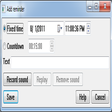
PostponeIt is a simple utility to to minimize distraction caused by such events and at the same time make sure that you will back to them when time comes. Just add a reminder and forget about it until the right time to think about it. You don't even have to type any text - just say several words into microphone and set date/time when it should pop up. To minimize distraction time PostponeIt provides two interfaces - keyboard-only and mouse-only - so you need not to switch your hand.

Download.com
Your review for PostponeIt
Download.com

AI Assisted Content Disclosure

Content created and reviewed by Softonic with information obtained from Ficusdev, using AI.

CNET's editorial team was not involved in the creation of this content. Opinions, analysis and reviews were not provided by CNET.