Used Pop Art Lite for iOS?


Pop Art Lite Analysis

AI Assisted Content ·

Not written by CNET Staff.

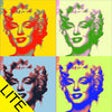
Pop Art Lite is a free multimedia application designed for iPhone users who wish to add a creative touch to their photographs. This app specializes in converting images into vibrant pop art styles, reminiscent of the iconic works of Andy Warhol. Users can choose from various filters and effects to enhance their photos, making it suitable for both casual users and those looking to explore digital artistry. The interface is user-friendly, allowing for quick navigation and application of effects, ensuring a smooth experience for all skill levels.

In addition to its core features, Pop Art Lite supports easy sharing options, enabling users to showcase their creations on social media platforms directly from the app. The app's lightweight design ensures that it does not consume excessive storage or resources on the iPhone, making it an accessible choice for anyone interested in digital photo manipulation. Whether for personal enjoyment or creative projects, Pop Art Lite offers a straightforward and engaging way to transform ordinary photos into eye-catching art.

Enlarged image for Pop Art Lite
Pop Art Lite 0/1

Used Pop Art Lite for iOS?


Explore More


Full Specifications

GENERAL
Release
Latest update
Version
2.0
OPERATING SYSTEMS
Platform
iOS
Operating System
iOS 12.1.2
Additional Requirements
Compatible with: iphone3gs, iphone3gs, ipadwifi, ipadwifi, ipad3g, ipad3g, ipodtouchthirdgen, ipodtouchthirdgen, iphone4, iphone4, ipodtouchfourthgen, ipodtouchfourthgen, ipad2wifi, ipad2wifi, ipad23g, ipad23g, iphone4s, iphone4s, ipadthirdgen, ipadthirdgen, ipadthirdgen4g, ipadthirdgen4g, iphone5, iphone5, ipodtouchfifthgen, ipodtouchfifthgen, ipadfourthgen, ipadfourthgen, ipadfourthgen4g, ipadfourthgen4g, ipadmini, ipadmini, ipadmini4g, ipadmini4g
POPULARITY
Total Downloads
192
Downloads Last Week
0

Report Software

Last Updated


Developer’s Description

+ AVAILABLE FOR IPHONE, IPOD TOUCH AND IPAD WITH IOS 5.0++ USE CAMERA OR PHOTO LIBRARY+ SAVE AND EMAIL YOUR POP ART PHOTO+ 240 BUILT-IN COLORS OR...
+ AVAILABLE FOR IPHONE, IPOD TOUCH AND IPAD WITH IOS 5.0++ USE CAMERA OR PHOTO LIBRARY+ SAVE AND EMAIL YOUR POP ART PHOTO+ 240 BUILT-IN COLORS OR MAKE YOUR OWN+ SAVE AND LOAD COLOR PRESETS OR USE 1 OF 5 PRE-BUILTFor a 'Pop Art Lite' demo, check out ==>http://youtu.be/R8lXkhmfXjk'Pop Art' was inspired by the Pop Art masterpieces of such artists as Andy Warhol and Roy Lichtenstein that arose out of the movement of the 1950's and 1960's. Pop Art brought about some of the most iconic imagery of our time including the Campbell's soup can and the Marilyn Monroe and Che Guevara prints and even influenced the Barack Obama campaign poster. With 'Pop Art' you can create your own custom Pop Art photos and save them back to your device or email them. Pop Art uses photos snapped from your camera or from your device's photo library. It has 240 customized colors: dark, light and highlights and you can create any custom colors of your choice. You can also save cool color combinations as custom presets and then reload them in order to apply the same Pop Art effect to different photos. The paid version of Pop Art has 20 customized Pop Art presets inspired by famous artists and no ads. 'Pop Art' is a simple, fun and easy-to-use app but quite useful for creating cool photos.Pop Art began in England in the 1950s and emerged in a different way in the United States in the 1960s. Pop is short for popular, as pop art reflected and expressed popular culture of the time. American Pop Art was a unified movement that "insisted on a direct relationship between its use of the imagery of mass production and its adoption of modern technological procedures." Each artist established their own style and identity which we can see clearly through the works of Andy Warhol and Roy Lichtenstein.

Download.com
Your review for Pop Art Lite
Download.com

AI Assisted Content Disclosure

Content created and reviewed by Softonic with information obtained from Adam Freeman, using AI.

CNET's editorial team was not involved in the creation of this content. Opinions, analysis and reviews were not provided by CNET.