Used Pic Morph - Morph Faces for Android?
Pic Morph - Morph Faces Analysis
AI Assisted Content ·
Not written by CNET Staff.
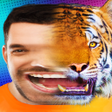
Pic Morph - Morph Faces is a free multimedia application for Android that allows users to create unique image transformations by blending two different faces. The app offers a variety of features that enable users to morph faces into amusing combinations or create fun GIFs and videos. Users can select photos from their gallery or use preloaded images of animals, celebrities, and more, making it a versatile tool for creative expression and entertainment. The user-friendly interface ensures that even those with minimal technical skills can easily navigate the app and produce interesting results.
Top Recommended Alternative
In addition to face morphing, Pic Morph provides options to customize images further by adjusting backgrounds, hair, eyes, lips, and skin tones. This opens up a range of possibilities for creating personalized images that can be shared with friends and family. The app is designed for casual users looking to have fun with their photos, making it a suitable choice for parties, social media posts, or just for a good laugh.
Used Pic Morph - Morph Faces for Android?
Explore More

Sponsored
Adobe Stock
Trial version
InShot - Video Editor & Photo Editor
Free
Tattoo Stencil
Paid
Nebi - Film Photo
Free
Sexy Photo Montage
Free
Name Photo Editor - Photo Pe Naam Likhe
Free
Smart Gallery
Free
Movie Effects Photo Editor: FX Montage Maker
Free
Photo Calendar Widget Free
Free
Zoetropic (free) - Photo in motion
Free
Men Body Styles SixPack tattoo
Free
InSquare Pic - Photo Editor, No Crop, Collage
Free











