Used Ocean 3D Live Wallpaper for Windows 10 for Windows?
Ocean 3D Live Wallpaper for Windows 10 Analysis
AI Assisted Content ·
Not written by CNET Staff.
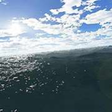
Ocean 3D Live Wallpaper for Windows 10 transforms your desktop into a serene aquatic environment. This full version application features stunning 3D animations that simulate the calming effects of ocean waves, marine life, and underwater scenery. Users can customize settings to adjust the wallpaper's appearance, including the level of detail and animation speed, creating a personalized visual experience that enhances any workspace.
Top Recommended Alternative
The software is designed for Windows 10, ensuring compatibility with the latest operating system features. It operates smoothly without consuming excessive system resources, making it suitable for both casual and professional users. The installation process is straightforward, allowing users to quickly set up their new wallpaper and enjoy the tranquil ambiance it provides.
Used Ocean 3D Live Wallpaper for Windows 10 for Windows?
Explore More

RbApp
Trial version
Automatically Drag Without Holding Mouse Down Software
Trial version
Gant 2 Ocean
FreeJohannis Kirche
Free
Hotel Tab Bar Icons for iPhone
Trial version
XUS Desktop 32bit Final Edition
Trial version
Barbie Summer Dresses
FreeLookWAYup dictionary Vista Gadget
Free
LockAndLaunch
Free
Shell for Windows
Free
Prime Desktop 3D
Trial version
Dazzling Stained Glass for Windows 10
Free











