Used Nice Simple Clock (Widget) for Android?


Nice Simple Clock (Widget) Analysis

AI Assisted Content ·

Not written by CNET Staff.

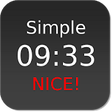
Nice Simple Clock Widget is a free Android application designed to provide users with a straightforward and customizable clock display on their home screens. Featuring an intuitive interface, this widget allows users to choose from various clock styles, colors, and sizes to suit their personal preferences. It is compatible with Android versions 9.0 and above, ensuring a wide range of devices can utilize its features.

Top Recommended Alternative

In addition to its aesthetic options, Nice Simple Clock Widget supports multiple languages, including English, Chinese, and Japanese. Users can easily integrate the widget into their home screens, offering not only functionality but also enhancing the visual appeal of their device. The software's simplicity makes it suitable for users looking for an efficient way to keep track of time without unnecessary complexity.

Enlarged image for Nice Simple Clock (Widget…
Nice Simple Clock (Widget) 0/4

Used Nice Simple Clock (Widget) for Android?


Explore More


Full Specifications

GENERAL
Release
Latest update
Version
1.9.4
OPERATING SYSTEMS
Platform
Android
Additional Requirements
Requires Android 1.6 and up
POPULARITY
Total Downloads
95
Downloads Last Week
7

Report Software

Program available in other languages


Last Updated


Developer’s Description

A simple yet customizable clock widget with colorful semi-transparent background...

A simple yet customizable clock widget with colorful semi-transparent background

Features:

- Minimalistic style

- Colorful semi-transparent background (You have the complete control of the color, transparency, and even the roundness of the rounded edges / corners)

- Customizable text size, fatness, and color

- Customizable time and date formats

- Live preview of the customized clock in the setting screen

- Possibility to have more than one Nice Simple Clock widgets on the home screen, each with its own customization settings

- Custom time offset option for displaying time in different timezones

- Custom year offset option for special calendar systems

- Ability to launch any user-selected application (e.g. alarm clock) upon a click on the widget

- Different widget sizes support

- Battery-friendly design

How to use:

This is a widget for your homescreen (desktop). To use it, please follow these simple steps.

For newer versions of Android (e.g. 4.0), you may drag and drop a "Nice Simple Clock Widget" item from the Widgets tab of your app list to the homescreen. You may refer to this demonstration video: https://www.youtube.com/watch?v=xXAWx7gsJ-o

For older versions (e.g. 2.3.3) you can long press (i.e. tap and hold) on any empty space on your home screen, then select Widgets and choose a "Nice Simple Clock Widget" item.

Different widget items correspond to different widget sizes (e.g. 1x1, 2x2, etc.).

After adding the clock widget to your homescreen, tapping it will open the configuration window. You can add more than one "Nice Simple Clock Widget" to your homescreen and each of them can have its own unique settings.

*NOTE* If the time does not update properly, please exclude this widget from any task killer app that you might be using. You can also try to remove this widget from your homescreen and add it back again, and see if it solves the problem.


Download.com
Your review for Nice Simple Clock (Widget)
Download.com

AI Assisted Content Disclosure

Content created and reviewed by Softonic with information obtained from nullium, using AI.

CNET's editorial team was not involved in the creation of this content. Opinions, analysis and reviews were not provided by CNET.