Used Matrix screensaver for Android?
Matrix screensaver Analysis
AI Assisted Content ·
Not written by CNET Staff.
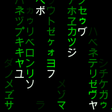
Matrix Screensaver is an innovative Android application that enhances the charging experience by turning your device into a captivating display. Utilizing the Daydream feature, this app showcases a procedurally generated digital rain effect, reminiscent of the famous Matrix film. Each time the device is docked or charging, users are treated to a unique visual experience, ensuring that no two displays are identical. The app is designed to provide a visually engaging backdrop that elevates the mundane act of charging a device into an artistic showcase.
Top Recommended Alternative
The application offers a wide range of customization options, enabling users to tailor their screensaver to their liking. Users can modify various aspects, including colors, text, and battery indicators, to create a personalized aesthetic. The settings allow adjustments in size, speed, spacing, and background color, making it easy to achieve the desired look. While the app effectively serves as a screensaver, it is important to note that it does not function as a wallpaper and cannot be set on the home screen.
Used Matrix screensaver for Android?
Explore More

Launcher iOS 16
Free
Achromatic KWGT
Free
Nether Portal Live Wallpaper
Free
Redmi Note 7 Theme, Xiaomi 7 Launcher
Free
SuperCar Launcher Car Themes
Free
GO SMS PHANTOM THEME
Free
TouchWiz Style CM12 Theme
Free
GO SMS DREAM PARIS THEME
Free
Birds Live Wallpaper
Free
Spring Flower Live Wallpaper
Free
Theme TouchPal Dusk White
Free
Saturn Kwgt
Free











