Used HP50g for iOS?


HP50g Analysis

AI Assisted Content ·

Not written by CNET Staff.

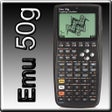
Emu50g is a robust emulator for the HP50g scientific calculator, designed for iPhone users who need calculator functionality on the go. The emulator replicates the full capabilities of the original device, allowing users to perform complex calculations seamlessly. Key features include the ability to save and restore calculator states, manage personalized libraries, and easily share results via clipboard functionality. Additionally, it offers file transfer capabilities over WiFi or LAN, enhancing data management between devices.

Top Recommended Alternative

The emulator supports original HD skin files for an authentic visual appearance and provides landscape orientation support with the Whole Sized skin on iPads. Sound effects enrich the user experience, making the emulator feel more interactive. Users can tap the LCD screen for additional information and features. Emu50g caters to students, engineers, and calculator enthusiasts alike, presenting a versatile tool for mathematical tasks.

Enlarged image for HP50g
HP50g 0/1

Used HP50g for iOS?


Explore More


Full Specifications

GENERAL
Release
Latest update
Version
1.3.3
OPERATING SYSTEMS
Platform
iOS
Operating System
iOS 16.4
POPULARITY
Total Downloads
164
Downloads Last Week
1

Report Software

Program available in other languages


Last Updated


Developer’s Description

HP50G is an emulator for the famous HP50g scientific calculator with its original skin. Carry your favorite calculator along with you every day and...
HP50G is an emulator for the famous HP50g scientific calculator with its original skin. Carry your favorite calculator along with you every day and use it together with your favorite library!Features:-------- Full emulation of the HP50g calculator. (You should refer to original HP50g user guide to learn how to use it.) Save (backup) actual calc state and create new one. Load saved state (restore backup). Save and load your favorite libraries, etc. (you must provide them by yourself) Copy and paste your calculator results or screenshots to and from the iPhone/iPod clipboard. Transfer files from and to your computer (WiFi and LAN required). Original HD skin files. Support for landscape (currently for Whole Sized skin iPad default skin) Support of sound effects. Tap the LCD to get more information.

Download.com
Your review for HP50g
Download.com

AI Assisted Content Disclosure

Content created and reviewed by Softonic with information obtained from TheWinterStorm (Marek Zima), using AI.

CNET's editorial team was not involved in the creation of this content. Opinions, analysis and reviews were not provided by CNET.