Used Fluid Clock Live Wallpaper for Android?
Editors’ Review
Renders a touch-responsive fluid surface with an integrated digital clock that you can reposition and recolor; backgrounds shift through day-to-night cycles. Developed by G30G as an Android live wallpaper, the app layers interactive physics and time-aware scenes. It pairs ripple-based water simulation with customizable clock fonts and optional 3D fish themes. Suited to Android users who prioritize animated, tactile home screens and a visible time display that responds to touch.
What the app changes about the home screen
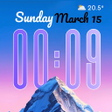
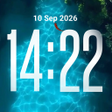
The app replaces a static background with an interactive scene: touch creates realistic ripples in a simulated water surface and the wallpaper displays a digital clock. Backgrounds transition through sunrise, cloudy daytime, and starry night scenes automatically, and some themes include interactive 3D fish that react to taps and feeding gestures. Personalization applies separately to the home screen and the lock screen, letting the wallpaper run as a live wallpaper service.
How deep the customization controls go
The app exposes specific clock controls including selectable font styles, text colors, and screen placement, plus theme-level toggles for water behavior and fish interaction. Users can choose which visual theme runs and whether the 3D fish appear; font and position settings let you place the clock where it won’t obscure widgets. These controls target users who want visible timekeeping combined with interactive background elements.
How it may affect device resources
The app uses high-definition visual assets together with an interactive fluid physics engine, so animated scenes and 3D animal models run continuously as a wallpaper process. Because those elements are explicit in the design, GPU and battery demands increase during active sessions compared with static backgrounds, especially on older or entry-level hardware. The wallpaper runs as a background service typical for Android live wallpapers.
Installation, compatibility and maintenance expectations
The app is distributed through the Google Play Store and installs as a standard live wallpaper on compatible smartphones and tablets. The developer focuses on personalization utilities, and the app’s theme settings appear accessible from the live wallpaper picker without advanced configuration. As a recent personalization release from a developer with similar titles, it may receive iterative updates and additional themes over time.
Pros
- Touch-responsive fluid simulation produces natural-looking ripples on tap
- Clock supports font selection, color changes, and on-screen placement
- Backgrounds change with time of day (sunrise to starry night)
- Optional 3D fish themes add an extra layer of interactivity
Cons
- High-definition visuals and fluid simulation increase GPU and battery demands
- Interactive 3D fish add processing overhead compared to static wallpapers
Bottom Line
Who should install it and what to consider
The app suits Android users who want an animated, touch-reactive wallpaper that also shows the time; its design favors visible, interactive backgrounds over minimal battery use. Because the developer positions it as a high-fidelity personalization tool and it is a recent release, expect ongoing refinements. Users with older devices or tight battery requirements should consider testing performance before making it their default wallpaper.
Used Fluid Clock Live Wallpaper for Android?