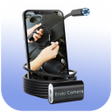
Used Endoscope USB Camera Otg Checker for Android?
Endoscope USB Camera Otg Checker Analysis
AI Assisted Content ·
Not written by CNET Staff.
Endoscope USB Camera Otg Checker is a free utility designed for Android devices, providing users with a straightforward method to verify whether their devices can capture and save video from USB cameras, including endoscopes. This application facilitates the connection check of USB cameras through an OTG USB cable, allowing users to easily determine compatibility with their Android devices.
Top Recommended Alternative
The app is designed with user-friendliness in mind, enabling quick checks of USB camera functionality. Users can also test the endoscope app for Android devices, ensuring that their borescope cameras work properly. By sending recorded video, the app assists users in confirming the operational status of their USB cameras, making it a practical tool for those requiring USB camera functionality on their devices.
Used Endoscope USB Camera Otg Checker for Android?
Explore More

EZ VPN: Fast Security
Free
Garena Topup
Free
Hoop VPN
Free
Whatscan for Whatsapp Web
Free
Parts Catalog Honda
Free
NordVPN: Private WiFi & Security - Unlimited VPN
Free
Super Flashlight LED Torch
Free
Free License Plate Search App
Free
Video Cutter And Editor
Free
show battery percentage
Free
Slo Mo Camera with Slow-Motion Video Editor
Free
Flitto - Auto & Human translations in one place
Free











