Used Emsa Time Synchronizer for Windows?


Editors’ Review

Download.com staff
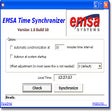
Emsa Time Synchronizer offers effortless PC clock synchronization with atomic Internet time servers. It's a straightforward utility for maintaining accurate computer time.
Enlarged image for Emsa Time Synchronizer
Emsa Time Synchronizer 0/1
  • Pros

    • One-click time synchronization
    • Uses atomic Internet time servers
    • Runs as a system tray icon
    • Configurable to run at startup
    • Supports continuous re-synchronization
  • Cons

    • Limited configuration options beyond interval
    • No advanced features like multiple server support

Used Emsa Time Synchronizer for Windows?


Explore More


Full Specifications

GENERAL
Release
Latest update
Version
1.0.58
OPERATING SYSTEMS
Platform
Windows
Operating System
  • Windows 98
  • Windows XP
  • Windows 98 SE
  • Windows ME
  • Windows 2000
POPULARITY
Total Downloads
218
Downloads Last Week
0

Report Software

Program available in other languages


Last Updated


User Reviews

2/5

1 User Votes


Developer’s Description

Synchronize your PC clock with an atomic Internet time server.

Emsa Time Synchronizer is a very simple but useful time synchronization utility. Users that like simplicity may indeed like this program. Just one click of a button - and your computer time is automatically set, using an atomic Internet time server. The program runs as system tray icon.

It can be configured to run automatically at Windows startup, and continuously re-synchronize your local computer time at an user-specified time interval.


Download.com
Your review for Emsa Time Synchronizer