Used Digital Clock Live Wallpaper for Android?
Digital Clock Live Wallpaper Analysis
AI Assisted Content ·
Not written by CNET Staff.
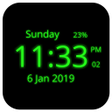
Digital Clock Live Wallpaper is an Android application designed to enhance the home screen by displaying the current time, date, and day of the week. This live wallpaper supports both 12-hour and 24-hour formats, allowing users to choose their preferred display style. It includes various customization options, such as selecting different colors for the clock, adjusting font sizes, and adding glow effects to suit individual preferences. Users can also set the current day and date as an optional display feature, making it a versatile tool for personalizing device appearance.
Top Recommended Alternative
In terms of functionality, the application offers a color picker for the LED clock, enabling users to create a unique aesthetic. Additionally, options to enable or disable the glow and neon effect provide further customization. The choice of clock style or font, along with background color settings, allows users to tailor their experience. Digital Clock Live Wallpaper serves as a practical solution for those looking to personalize their Android home screens with a functional and visually appealing clock display.
Used Digital Clock Live Wallpaper for Android?
Explore More

Hyper Bridge
Free
DockWalls - Generate Dock Bar
Free
ColorOS 16 Launcher
Free
OneUI Fluffy Icons
Paid
FMOVIES : Watch HD Movies
Free
Pinko theme for APUS Launcher
Free
Pencil Pack for FlipFont free
Free
Loud Volume Ringtones
Free
Spring Live Wallpaper
Free
Ourdreams Ai App Advice
Free
Easy Cleaner - Battery saver & optimizer
Free
GO SMS PRO SMART THEME
Free