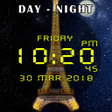
Used Day night automatic change clock wallpaper for Android?
Day night automatic change clock wallpaper Analysis
AI Assisted Content ·
Not written by CNET Staff.
Day Night Automatic Change Clock Wallpaper is a free Android application designed to enhance the aesthetic appeal of device screens. This utility allows users to customize their wallpaper according to different times of day, transitioning from day to night seamlessly. With a variety of themes available, users can select preferred backgrounds and clock designs, providing a personalized touch to their home screens. The app supports live wallpapers, enabling dynamic changes that reflect the time of day, which adds a unique visual element to the user experience.
Top Recommended Alternative
In addition to the changing backgrounds, the application offers features such as customizable clock colors and the ability to incorporate multiple images into the background. This flexibility allows for a creative expression of individual styles. Users can easily manage settings to ensure the wallpaper changes automatically, enhancing the overall functionality of their devices while maintaining an engaging visual interface.
Used Day night automatic change clock wallpaper for Android?
Explore More

3D keyboard New 2018 Version
Free
Clix - Icon Pack
Free
Beautiful Forest Free LWP
Free
Dog Licks Screen 4K Wallpaper
Free
(FREE) GO SMS PRO ROSE THEME
Free
Cute BFF Wallpaper for Girls HD Offline
Free
Cute Cats theme for APUS
Free
Girly Fonts for FlipFont
Free
Love Sakura Emoji Keyboard
Free
Galactic Core Donation
Paid
Flickr Photostreams for Muzei
Free
Mods Builder for Minecraft PE
Free











