Used CYBERPUNK Digital Clock Widget for Android?


CYBERPUNK Digital Clock Widget Analysis

AI Assisted Content ·

Not written by CNET Staff.

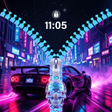
CYBERPUNK Digital Clock Widget is a personalization app for Android that transforms your device's home screen with a unique digital clock interface. This widget features a cyberpunk aesthetic, characterized by neon colors and futuristic designs, making it an appealing choice for those who enjoy sci-fi themes. Compatible with Android versions 4.3 and above, the app allows users to customize their clock display, offering various styles and settings to fit individual preferences. The app's interface is designed to be user-friendly, ensuring easy installation and setup on the home screen.

Top Recommended Alternative

In addition to its visual appeal, the CYBERPUNK Digital Clock Widget provides essential timekeeping functions, displaying the current time and date clearly. The widget is lightweight, ensuring it does not consume excessive system resources, which is advantageous for users with older devices. The current version available is 3.13, and it is available exclusively in English. This app caters to users looking to enhance their device's personalization while enjoying a modern and stylish time display.

Enlarged image for CYBERPUNK Digital Clock W…
CYBERPUNK Digital Clock Widget 0/4

Used CYBERPUNK Digital Clock Widget for Android?


Explore More

Full Specifications

GENERAL
Release
Latest update
Version
3.13
OPERATING SYSTEMS
Platform
Android
Additional Requirements
None
POPULARITY
Total Downloads
16
Downloads Last Week
0

Report Software

Program available in other languages


Last Updated


Developer’s Description

This app contains only the CYBERPUNK Digital Clock Widget.

This app contains only the CYBERPUNK Digital Clock Widget

Apps and widgets are used in the preview screenshots are not a part of this Clock Widget. More Apps, Widgets or Themes/Skins from the CYBERPUNK Collection available on Google Play Store.

This app includes 2 digital clock widgets, one is the full version (time, date & battery) and the other shows only the time.

Widget Content (FULL VERSION)

- Digital clock widget HD (801x601 pxl)

- 24 and 12 hour format with am / pm display

- Optional two kind of date display

- Show battery optional

- Show second optional

- Themed Homescreen HD wallpapers

- Music alarms, auto snooze and auto dismiss for each alarm

- Compatible with the internal software of devices like Samsung, LG, HTC, Google Now, etc.

- Compatible with all launchers (e.g. Apex Launcher, ADW Launcher, Nova Launcher, or Home++).

Widget Content (ONLY THE TIME)

- Digital clock widget HD (801x301 pxl)

- 24 and 12 hour format with am / pm display

- Themed Homescreen HD wallpapers

- Music alarms, auto snooze and auto dismiss for each alarm

- Compatible with all launchers

How to add the Clock Widget to your Homescreen?

Older Android OS: Press and hold on any homescreen on your Android phone. Select Widget under the Add to Home menu. Choose a widget that you would like to install.

Android 4.0 or higher: Go to your Desktop, press the six-square button on the top right, then on the top left there is a menu for Apps and Widgets. Hit the Widgets Menue and scroll through. Touch and Hold, and put on desktop. Make sure you have enough room for the widget.

Each Launcher has its own setting to install widgets and display them on the Homescreen, please read the description provided by the launcher for the widgets installation.

Change Position

To change the position of a widget, press the respective widget for several seconds and move it to the desired position. Then release it.

Change size

To change the size of a widget, press the widget for several seconds without moving it.

The widget is now displayed with a border. You can change the size of the widget by dragging the dots at the edge of the widget one by one in the desired direction. Once the widget has the correct size, tap a free space to complete the process.

Raster

If the clock is not displayed in the middle or in the correct size, you can also set the raster size for most launcher, either to position the widgets in the middle or to enlarge or reduce them.

The size setting of the grid is usually found in the setting of the launcher under "Screen settings" or "App drawer setting"

The available grid sizes are:

- 4 x 4 symbols

- 4 x 5 symbols

- 5 x 5 symbols

Clock Setting

Custom launcher menu for quick access by simply tapping the clock! Choose the high-quality wallpapers that complement the clock, and optional for the clock's alarm tone round out the package.

Contacts

If you have any problems or any suggestions for my Clock Widgets, please do not hesitate to tell me. I will help you! E-mail: scapemem1@gmail.com

memscapedigitalclock

memscapecyberpunk

copyright(c) all rights reserved Memscape


Download.com
Your review for CYBERPUNK Digital Clock Widget
Download.com

AI Assisted Content Disclosure

Content created and reviewed by Softonic with information obtained from Scapemode, using AI.

CNET's editorial team was not involved in the creation of this content. Opinions, analysis and reviews were not provided by CNET.