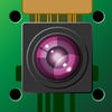
Used BerryCam | Control a Raspberry Pi camera from your iOS device for iOS?
BerryCam | Control a Raspberry Pi camera from your iOS device Analysis
AI Assisted Content ·
Not written by CNET Staff.
BerryCam is a free iOS application designed to facilitate the control of Raspberry Pi cameras directly from an iPhone. This utility allows users to remotely manage camera functions, providing a seamless interface for capturing images and videos. The app supports various camera settings, enabling adjustments to exposure, resolution, and frame rate, which enhances the functionality and versatility of Raspberry Pi projects.
Top Recommended Alternative

With BerryCam, users can easily connect to their Raspberry Pi devices over Wi-Fi, making it convenient for photography enthusiasts and hobbyists. The app’s user-friendly design ensures that both novice and experienced users can navigate its features efficiently. Additionally, BerryCam supports live video streaming, allowing users to view real-time footage from their camera, which is particularly useful for monitoring and remote recording.
Used BerryCam | Control a Raspberry Pi camera from your iOS device for iOS?
Explore More

Merlin-BeatMaster
FreeBIC
FreePDF Downloader (Good Reader and Manager)
FreeOilfield Emoji
PaidGeo Scan
Free
Dice & Dragons - RPG Dice Roller
FreeMOOD Keyboard by Notegraphy
Free
RemotePad
Free
Lumee Flashlight Torch
Paid
D3-Reseller-Patch.BLK
FreeSocial Gain - More Likes & Followers for Instagram
Free
Skydiving Logbook
Free











