Used AIR Remote FREE for Apple TV for Android?


AIR Remote FREE for Apple TV Analysis

AI Assisted Content ·

Not written by CNET Staff.

AIR Remote FREE for Apple TV is an innovative app designed for Android users, allowing them to control their Apple TV devices using their smartphones. This application leverages the infrared blaster found in compatible Android devices, eliminating the need for a physical remote. It supports all essential functions such as navigation (up, down, left, right), play/pause, and the OK button, making it a convenient alternative for users who often misplace their remotes. Furthermore, the app does not require jailbreaking the Apple TV, as it utilizes default infrared codes for seamless operation.

Top Recommended Alternative

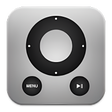
The user interface offers two control methods: the original remote layout and a swipe view. The swipe view allows users to navigate by swiping in the desired direction, with single taps acting as the confirm button and double taps triggering the menu. AIR Remote is compatible with various Mac products introduced since 2005 that have infrared receivers, expanding its usability beyond just Apple TV. However, it is important to note that the application functions exclusively on devices equipped with a built-in infrared blaster.

Enlarged image for AIR Remote FREE for Apple…
AIR Remote FREE for Apple TV 0/4

Used AIR Remote FREE for Apple TV for Android?


Explore More


Full Specifications

GENERAL
Release
Latest update
Version
3.5.0
OPERATING SYSTEMS
Platform
Android
Operating System
Android 9.0
POPULARITY
Total Downloads
340
Downloads Last Week
0

Report Software

Program available in other languages


Last Updated


Developer’s Description

Turn your phone into an infrared remote for your apple tv or macbook.

AIR Remote lets you control your Apple TV with your Android phone. It uses the infrared blaster to replace or extend your Apple TV remote in an smart way. No more being elbow-deep in the sofa cushions looking for your lost remote!

Jailbreaking your Apple TV is not required, because AIR Remote uses default infrared codes. AIR Remote is available for the most common android devices with built in infrared support (please see below).

AIR Remote is also compatible with any Mac products with infrared receiver (introduced since 2005). These include some MacBook Pro, iMac, Mac mini or the iPod Universal Dock.

All essential functions (up, down, left, right, play/pause and the OK Button) are supported. Additionally you cam press and hold the play/pause or OK Button for additional functions , like you would do with your classic Apple TV remote.

On the sidebar you will find the choice between the original remote and the swipe view. After selecting the swipe screen, you can activate the directions by swiping into a direction. Tapping once represents the confirm button and tapping twice will trigger the menu button.

Only working on devices with built-in infrared blaster!

Please consider that not every Custom ROM has built-in infrared support!

== Support ==

If the light of your Apple TV flashes and there is no other reaction , please check if your silver Apple TV remote is still paired and unpair it.

From the Main menu from the Apple TV choose Settings > General > Remotes and Unpair Apple Remote.

You find the ad-free Version of AIR Remote here - http://bit.ly/1nZXh5M


Download.com
Your review for AIR Remote FREE for Apple TV
Download.com

AI Assisted Content Disclosure

Content created and reviewed by Softonic with information obtained from YELOMO, using AI.

CNET's editorial team was not involved in the creation of this content. Opinions, analysis and reviews were not provided by CNET.