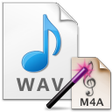
Used WAV To M4A Converter Software for Windows?
Editors’ Review
Download.com staff
Pros
- Supports batch conversion of multiple WAV files.
- Features a simple drag-and-drop file interface.
- Begins the entire batch process with one click.
- Retains original source bitrate for converted files.
- Allows setting a constant, user-defined output bitrate.
Cons
- Input is restricted to the WAV audio format.
- Output is limited to the M4A audio format.
- No built-in player for previewing audio files.
- Does not support editing audio file metadata.
- Lacks advanced audio encoding options beyond bitrate.
Used WAV To M4A Converter Software for Windows?
Explore More

Blue Market Pro
Trial version
ListerPro
Trial version
Jasper Line Music School Administration Software
Trial version
SpeedSEO
Free
Resource Booking Sheet
Trial versionNew York Notice To Vacate
Free
MyScript Studio Forms Edition
Trial version
Sample Browser for Windows 8
Free
Unit Conversion for Windows 8
Free
Resume Templates for Windows 10
PaidDigital WarRoom Express
Trial version
BidFellow
Trial version