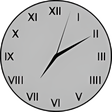
Simple Floating Clock is exactly what the name implies. When Apple released Mac OS X 10.5, the removed the option to show the clock in a floating, translucent window on the desktop. Some people liked that view so I decided to give it back.
None that I can see--the whole point was a clock that would work in fullscreen mode.
Cons
Disappears when I put an application (such as Scrivener) into fullscreen. Or Chrome. Or Outlook.
Summary
If I'm not in fullscreen I can see the digital clock in my menu. I need a clock that shows in every app in every window size.
Great little clock!
SamSam_Sam
Pros
So many options available for text, roman #, colours, etc.
Cons
Not much as far as I can tell
Summary
Love it for it works!!!
klo1--2008
Pros
Great apps!!!
Cons
None as of yet!!!
Summary
Works Well at first but...
spring14
Pros
Easy, Free, lot of choices
Cons
Visible at all times.
Summary
Seemed good until I opened up browser, program, etc.. The clock stays visible on top of anything you are running, very strange. I want the clock on my desktop but visible 100% of the time regardless of what I have open.
Doesn't work with Mountain Lion!
Officer_Hardee
Pros
Great app....but....
Cons
It bugs out with Mountain Lion! If you change your screensaver, it is lost in the background and you can't close it or move it! :P
Summary
Love the digital mode.
Binques
Pros
Clean, clear, simple.
Cons
No color choice for the background in analog mode.
Summary
Utilitarian, useful.<br /><br /><span class='notifyMsg'> Updated </span>on Oct 28, 2011<p/>Gah! I realized right after I posted the review that there IS a color option for the face. SORRY! (idiot)
GREAT, but no longer works with 10.6.7
henrystargazer
Pros
Simple, well designed
Cons
None that I can think of!
Summary
I treasure it!
Easy to use, provides an analog clock on your desktop
rhun
Pros
Lots of options to change size, lettering, date, transparency
Cons
none - just a Simple Floating Clock
Summary
Just the ticker(t) everyone must have.
knjj
Pros
Everything. Just what I was looking for. When you are watching a movie or streaming video you can still see the time.
Cons
This is so simple to use I could not find any immediate fault with it.
Summary
A must have for everybody. Why this is not a packaged option with the OS is beyond me. For best functionality, set the hands to white and face to black switch it to digital and shrink it right down. Open a video file in full screen and reposition the clock to the top right corner. Set it to start at login and click through. Now you are set, you have a simple clock available at all times. If you require different time zones, simply open other clocks.
Perfect!
dsilvertx
Pros
Cons
Summary
This review was originally posted on VersionTracker.com.<br />My search for the perfect desktop clock finally came to a close. This is exactly what I was looking for. I'm displaying 4 time zones in very little space and with the colors and styles I want. The only thing would I would love to see added is the ability to change the time zone abbreviations on the clocks themselves to a city of my choosing.