Used 3D Digital Weather Clock Free for Android?


3D Digital Weather Clock Free Analysis

AI Assisted Content ·

Not written by CNET Staff.

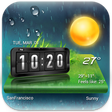
3D Digital Weather Clock Free is a weather application designed for Android devices, offering users a visually appealing way to check the current weather conditions and time. The app features a 3D digital clock display that combines both time and weather information, making it easy for users to stay informed at a glance. With customizable themes and backgrounds, users can personalize the appearance to fit their preferences.

Top Recommended Alternative

In addition to its aesthetic appeal, the software provides real-time weather updates, including temperature, humidity, and forecast data. Users can also set multiple locations to track weather conditions in different areas. The app’s user-friendly interface ensures that even those with minimal technical knowledge can navigate and utilize its features effectively.

Enlarged image for 3D Digital Weather Clock …
3D Digital Weather Clock Free 0/4

Used 3D Digital Weather Clock Free for Android?

Explore More


Full Specifications

GENERAL
Release
Latest update
Version
7.3.0.1012-release
OPERATING SYSTEMS
Platform
Android
Additional Requirements
None
POPULARITY
Total Downloads
212
Downloads Last Week
2

Report Software

Program available in other languages


Last Updated


Developer’s Description

3D Digital Clock Widget with 7 day weather forecast, a best android clock widget.
An Android Clock Widgets Collection is available now. Best Clock Widget for Android with clock and weather, you can find your favorite digital clock widget, analog clock widget or alarm clock widget here for your android home screen. Digital Clock Widgets Series -- Digital clock widget is a full featured, fully customizable digital clock and weather forecast widget for android. Set this digital clock widget on home screen, to make your android phone even cooler than before. Analog Clock Widgets Series -- We are proudly presenting this fully animated Analog Clock Widget, including moving gears and second hand looking beautifully and stunning on your Android phone. Transform your phone into envy-making item with Analog Clock Widgets. Alarm Clock Widgets Series -- Alarm Clock is the new form of simplicity with elegantly designed clocks and current weather conditions. Alarm Clock is designed to be a shortcut for you to access system alarm clock, world clock, and timer settings. Apart from minimalistic design, we have also developed Alarm Clock to use very low system resources. It can be used as beautiful desk clock as it sits on your home screen. Features of digital / analog / alarm clock and weather widget: Lots of clock and weather widget designs for customizations- Tap on widget to load up alarm/calendar/weather/widget settings page- Display the next alarm, next calendar event and week number on the widget- Flip Clock animation- Analog Clock Widgets Series with animated gears and second hand. Beautiful clock widgets: check the time right on your Home Screen- Resizable widget layout- Lock Screen Widget mode- Integrated alarm clock- Auto adjustment for alarms while changing time zones- Clock and Weather Unites Setting: You can reset the temperature unit (Fahrenheit / Celsius), time format (12h / 24h), weather report update interval of time, the unit of wind speed, pressure unit, etc. Current Weather Info: detailed real-time weather report, including real-time weather and temperature, "feels like" temperature, precipitation, UV index, humidity, visibility, pressure, pollen counts, in the direction of the wind speed, time of sunrise / sunset, etc. Hourly & Daily Weather forecast: including weather prediction, the high/low temperature, rainfall, wind, etc. You can check all these data are detailed in daily or even hourly. For scheduling outdoor activities - Sunrise /Sunset times right on widget screen, better plan your outdoor activities. Air Quality Index (AQI) : Present air quality index for 20, 000 locations worldwide. World Weather: Ability to change location for weather information for any city in the world: Bangkok, Kuala Lumpur, Athens, London, Manchester, Cambridge, Los Angeles, New York, Chicago, Las Vegas, Hawaii, Sydney, Perth, Tokyo, Ottawa, Toronto, Victoria, Berlin, Florence, Bari, etc. Precipitation Forecast: Inform you before it rains. Weather Alerts: Informing the real-time alerts and weather warnings. 3 The exceptional characteristics of clock and weather widget: * AccurateLocal Weather Forecast that provide professional and accurate weather service to 20, 000 locations thousands worldwide. * ConvenientConveniently to check the clock and weather without opening an application. * CustomizedOffer a widget collection with various themes for you to customize your home screen. HOW TO ADD A WIDGET: 1. On your Android home screen, tap any blank or "empty" area with size 4x2 and hold down your finger. 2. An "Add to Home screen" window will pop up. From that window, tap "Widgets". 3. You'll be presented with a list of all the installed Widgets on your Android device. 4. Select the clock and weather widget to add to your home screen by tapping it. NOTICE: Please exclude the widget from any task killers, this will resolve the time freezing issue. Stay in touchIf you would like to help with the translation and localization, please write to: support@amberweather.com.

Download.com
Your review for 3D Digital Weather Clock Free
Download.com

AI Assisted Content Disclosure

Content created and reviewed by Softonic with information obtained from Weather Widget Theme Dev Team, using AI.

CNET's editorial team was not involved in the creation of this content. Opinions, analysis and reviews were not provided by CNET.