• On MovieTome: See the villain of IRON MAN 2!

PanoramaStudio 1.5

Download Now (3.18MB)
Tested spyware free

Features

  • License:

    Free to try; $42.95 to buy

  • Editor's Rating:

    Not rated

  • Average User Rating:

    5.0 stars (out of 8 votes) Rate it!

  • Downloads:

    6,135

  • Operating Systems:

    Windows Vista, Windows Me, Windows XP, Windows 2000, Windows 98

  • Additional Requirements:

    Windows 98/Me/2000/XP/2003 Server/Vista

  • Limitations:

    30-day trial

  • Date Added:

    April 03, 2007

  • Previous Versions:

Publisher's description of PanoramaStudio

PanoramaStudio screenshot PanoramaStudio screenshot
PanoramaStudio screenshot
PanoramaStudio screenshot PanoramaStudio screenshot
From Tobias Huellmandel Software:

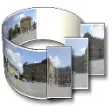
PanoramaStudio creates seamless 360 degree and wide angle panoramas from sets of photos. The software combines the automatic creation of high quality panoramic images with extensive post-processing features for advanced users in an easy and clearly arranged user interface. The automatic assembling contains an enhancing and blending of the photos as well as an automatic detection of focal length and lens correction. To achieve best stitching results the profiles of more than 800 digital cameras are already stored in the internal database.

Besides perspective correction, automatic exposure correction, and automatic cropping, there are image-processing filters for optimizing the panorama and a hotspot editing tool for virtual tours included. The output options include the most common image file formats, interactive QuickTimeVR and Java panoramas, screensavers, and an integrated poster printing function.

See more CNET content tagged:
photograph
Introducing the simplest way to share photos and videos

More popular Digital Photo Tools downloads

  1. 4,673 downloads 1. MemoriesOnTV
  2. 3,075 downloads 2. ACDSee Photo Manager 2009
  3. 2,842 downloads 3. Photo Story 3 for Windows
  4. 2,727 downloads 4. Adobe Photoshop Album Starter Edition
  5. 2,664 downloads 5. Art Plus Digital Photo Recovery
  6. See all Digital Photo Tools downloads
Recover deleted files, perform unformat recovery and corrupt drive recovery.

User reviews

  • Showing 5 of 5 user reviewsSee all 5 user reviews
    This software version | All versions

  • 5 stars

    83 out of 111 people found this review helpful

    Version: PanoramaStudio 1.5

    "The best I have ever tried"

    by goldengreeke on April 3, 2007

    Pros: PanoramaStudio 1.5 is the easiest photo collage product I have ever tried. It will blend, stitch, resize, and crop in seconds. I merged three photos into an awesome panorama in less than 3 minutes, and I had never tried to do this before! PanoramaStudio has a full working free trial for 30 days,and I recommend you give it it try. It's a lot of fun to see what you can create!

    Cons: Only that it's not free.

    Was this review helpful? YES | NO

    Reply to this review

  • 5 stars

    1 out of 1 people found this review helpful

    Version: PanoramaStudio 1.5

    "Don't take a pic without it!!!"

    by DrStone7 on April 29, 2007

    Pros: I LOVE this tool. First thing, it is compatible with Vista. The best part is it works very well, it is simple, and it has more tools than just stitching. I tried just about all the tools listed on CNet for downloads and by far this one is the best. It may not be as powerful as some tools but who has a week to learn a new app and hour to stitch three pics? It stitches pics that are at different distances, serious overlaps, and that have different levels of color. After downloading the app I was able to stitch three pis to perfection in less than 5 min. I had success with other apps, but none this fast and this level of quality. (Great price to)

    Cons: No cons with the stitching, enhancing, or cropping, those are great. I would like to see an integrated photo gallery with tools or an integration with MS Photo Gallery.

    Was this review helpful? YES | NO

    Reply to this review

  • 5 stars

    Version: PanoramaStudio 1.5

    "This is the best 360!"

    by doggysmart2 on October 15, 2007

    Pros: I have used other softwares, this is the best one i have ever used, no ghost images,

    no warps, and no overlaps! it automatically knows my camera and unlike other softwares, this one really kicks! I recommend this one for sure! And it will save your panorama in Quicktime or Java!

    Cons: There are actually two commands when making a 360, there is create a panorama, then there is a command to make a 360 panorama, which will allow it to spin continuously. it's not a fault, it's just allowing you to decide between a wide screen panorama and a continuous 360, which is actually a plus in this software!

    Was this review helpful? YES | NO

    Reply to this review

  • 5 stars

    Version: PanoramaStudio 1.5

    "I would pay 10x's the price!!"

    by wagnerdelia on June 6, 2009

    Pros: Easy, cheap, great quality

    Cons: I LOVE IT, no cons yet

    Summary: I downloaded over 10 different virtual tour tryouts and I have to say that this is by far the best. Not only is it easy but it is CHEAP. Other applications I tried were hundreds of dollar$ and not even close to the quality and ease of use. TRY I... read more >>

    Was this review helpful? YES | NO

    Reply to this review

  • 5 stars

    Version: PanoramaStudio 1.5

    "Easy, works"

    by mojobot on September 26, 2008

    Pros: User friendly

    Cons: None so far

    Summary: I was looking for something to replace Nikon's PictureProject and Panorama maker, since they keep crashing now that I've switched to Vista. In fairness, they were designed for Win XP. I tested PanoramaStudio for about half an hour before purchasin... read more >>

    Was this review helpful? YES | NO

    Reply to this review

  • See all 5 user reviews Write review

Submit your review

Log in or create an account to submit your review for:

PanoramaStudio 1.5

ORLog in with your Facebook account
1. Rate this product:
(Mouse over the stars to rate this product and click to set your rating.)
2. One-line summary:(Summarize your review in one line. 10 characters minimum; required.)
0 of 55 characters
3. Pros:(Tell us what you like about this product. 10 characters minimum; required.)
0 of 250 characters
4. Cons:(Tell us what you don't like about this product. 10 characters minimum; required.)
0 of 250 characters
Bottom-line summary:(Explain to us in detail why you like or dislike the product, focusing your comments on the product's features and functionality, and your experience using the product. This field is optional.)
0 of 5000 characters

The posting of advertisements, profanity, or personal attacks are prohibited.
Click here to review our site terms of use.

Submit

You must be 13 years of age or older to submit personal information to CNET Networks. In compliance with the Children's Online Privacy Protection Act of 1998, CNET Networks does not accept name and e-mail address information from users who are under 13 years of age.

All submitted ratings and written comments become the sole property of CNET Networks, Inc. (CNET) and may be used at CNET Networks' sole discretion. Ratings and written comments are generally posted within two to four business days in batch groups, not in real time. However, CNET Networks reserves the right to remove or refuse to post any submission for any reason. You acknowledge that you, not CNET Networks, are responsible for the contents of your submission.

CNET Networks is not responsible for the content of the publisher's descriptions or user reviews on this site. We encourage you to determine whether this product or your intended use is legal. We do not encourage or condone the use of any software in violation of applicable laws. CNET Download.com does not sell, resell, or license any of the products listed on the site. We cannot be held liable for issues that arise from the download or use of these products.

Get free trials and software from our premier partners

advertisement
mySimon Outdoor Gear mySimon Swimwear mySimon Home and Garden