NotesHolder Lite for Windows
- By A!K Research
- Trial version
- User Rating
Used NotesHolder Lite for Windows?
Editors’ Review
Ever had to write yourself a quick message? NotesHolder is a program designed to let you scribble down thoughts and quickly return to the business at hand. With a sleek design and simple commands, this could replace those little yellow paper stickies littering your desk.
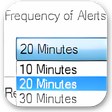
This program embeds itself in your desktop's tray for easy access. Its interface is very simple and should be a breeze for all note writers. This rectangular display has a box at the top prompting users to double click and enter their note. This brings up a new box that can easily be filled in. The box also has two options: setting an alarm and highlighting this particular note. The alarm is very basic, allowing for the note to pop up onto the desktop at the time and frequency of your choosing.
NotesHolder is a great example of a simple program that does its job well. Where other note-taking downloads overwhelm users with options, this program keeps things basic. This approach helps users of all skill levels jot down an idea quickly and store it for an indeterminate time. While you cannot customize colors, fonts, or other details, it doesn't feel necessary with a smooth program like this. We highly recommend this 15-day trial for anyone in need of a simple note-making program.
What’s new in version 2.1-build-137
Version 2.1 build 137 adds check for updates feature to the main menu.
NotesHolder Lite for Windows
- By A!K Research
- Trial version
- User Rating
Used NotesHolder Lite for Windows?
Explore More

Employee Phone Directory Deluxe
Trial version
Task Coach Portable
Free
VCF Editor Software
Trial version
Event Organizer Deluxe
Trial version
Yaware Client for Windows
Trial version
The Life Organizer
FreemyPortablePIM Express
Free
Easy Address Book
Free
Rainlendar (32-bit)
Free
Todoist
Trial version
TS45 Productive Time Slicer for Windows 8
Free
Phone Number Wordifier for Windows 8
Free