CNET Editors' review
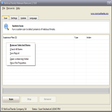
Even with a good spyware fighter, it can be difficult to tell exactly what's running on your computer, and what each cryptically named process is actually doing. MalWhere helps guide computer users through the thicket of active computer programs, identifying each bit of software that's running in the background, describing whether it's a driver for your video card or a dangerous Trojan horse, and rating its potential danger. Another program will be needed to actually remove any malware found, however. We were perplexed with a few of the program's ratings; for instance, it marked a popular antispyware utility as very unsafe. Overall, MalWhere could be a very useful tool to help explain exactly what's happening on your computer, but we recommend having dedicated antivirus and antispyware tools to be fully protected from Net-borne threats.Publisher's Description
From SoftBulldog:
MalWhere is the perfect complement to firewalls and anti-virus software; with MalWhere you can monitor all the processes that run on your computer and identify those that impose a security risk. Identify those processes that harbor spyware and Trojans violating your privacy and giving hackers free reign on your computer. Know who is using your precious system resources.
More Popular Anti-Spyware downloads
- Malwarebytes Anti-Malware
385,736 downloads
- Ad-Aware Free Antivirus +
250,313 downloads
- Spybot - Search & Destroy
27,682 downloads
- SuperAntiSpyware Free Edition
13,808 downloads
- Trend Micro HijackThis
12,917 downloads
-
All versions:
2.2 starsout of 24 votes
-
Current version:
2.0 starsout of 4 votes
-
My rating:
Write review
Results 1-3 of 3
-
"not good"
Version: MalWhere 1.12
Pros
none
Cons
sent my computer haywire! would'nt uninstall! somthing is definetly not right with this sample program!
-
"nice not"
Version: MalWhere 1.12
Pros
none
Cons
i downloaded it and instailed it and never guess wot a trojan horse came with it. nice program.. NOT.... oh ignore the star rating id give it a big fat 0..
-
"good addition to task manager"
Version: MalWhere 1.12
Pros
(AVG, A-squared & SuperAntiSpyware gave it the O.K.) Tested this with Task Mgr. open & started other progs. and it works...helps you find the answers... lots of help files and even a help forum. Found it very handy and it comes with it's own uninstaller. Give it a try!
Cons
Every time you use it, it does a google-search and comes back with cookies. Maybe if it used my Opera or FireFox browser it would come back clean.
Results 1-3 of 3
Add Your Review
Submit your reply
E-mail this review
Report offensive content
See more CNET content tagged:
Previous Versions: