CNET Editors' review
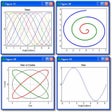
DreamCalc Graphing Edition is a calculator with scientific and graphing capabilities. It offers three different views (Simple Calculator, Scientific Standard, Scientific Base-N) to handle all of your math needs.
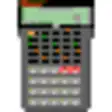
The program has an attractive interface that looks like an actual calculator. When DreamCalc opens, the window is small so you can easily use the calculator in tandem with other applications. This is a practical design for students, accountants, and math professionals. DreamCalc's display is easy to read and use, and those familiar with standard and scientific calculators will be able to navigate its menus and features deftly. It can be used for algebra, trigonometry, and simple math, allowing you to graph functions, plot data, and statistics. You can print your data as well. We liked that there is a simple calculator included. The simple calculator suits the needs of the everyday user, while the Scientific and Scientific Base-N views suit the needs of advanced users. DreamCalc has a good Help section that is handy for users new to graphing calculators and users who haven't used a graphic calculator since high school math class.
This is an unlimited trial version of the software. It installs and uninstalls with no complications. The program will remind you to buy it every time you open it, but the trial version has no limitations. We recommend it for all users.
Publisher's Description
From Big Angry Dog:
DreamCalc Graphing Edition is an alternative to a hand-held Graphing Calculator for your PC or laptop. You'll be able to graph functions and plot list data more simply than ever before, while experiencing the intuitive feel and productivity of using a real hand-held. Select from Reverse Polish Notation or two styles of algebraic input, and with the optional ability to run in your Windows system tray--DreamCalc will always be there whenever you need to reach for a calculator.
What's new in this version: New User Guide. Minor updates.
More Products to Consider
- Instantly compute the result as you type math expressions.Download
Installed
Smart Install - Dispense with your handheld financial calculator.Download
Installed
Smart Install - Make calculations using scientific calculator with a paper trai...Download
Installed
Smart Install - Hear the Athan (Azan) automatically five times a day at each pr...Download
Installed
Smart Install - Look up words in thesaurus and dictionary from almost any progr...Download
Installed
Smart Install - View satellite pictures, maps, terrain, buildings and other glo...Download
Installed
Smart Install - Discover how to type and improve your typing.Download
Installed
Smart Install - View your real-time physical position on moving Google Map.Download
Installed
Smart Install - Get reminders about prayer time.Download
Installed
Smart Install - Use this program to convert distance, volume, speed, and temper...Download
Installed
Smart Install - View, read, and convert EPub eBooks.Download
Installed
Smart Install - Discover this scientific calculator with extended functions.Download
Installed
Smart Install - Place a scientific calculator with full range of scientific fun...Download
Installed
Smart Install - Learn touch-typing with a program that dynamically adjusts trai...Download
Installed
Smart Install - Perform financial calculations on your PC.Download
Installed
Smart Install - Get English and Sinhala definitions with technical terms glossa...Download
Installed
Smart Install - Calculate mortgage bond payments and compare mortgage bond plan...Download
Installed
Smart Install - Allow you to perform a live saving operation on your Windows PC...Download
Installed
Smart Install - Perform various scientific calculations.Download
Installed
Smart Install - Read and Listen the Quran in many languages, with famous recite...Download
Installed
Smart Install - Record and automate various computer repetitive tasks.Download
Installed
Smart Install - Exercise your typing fingers with practice lessons and entertai...Download
Installed
Smart Install - Calculate loans and debt with financial calculators with an amo...Download
Installed
Smart Install - Convert ePub, HTML, XML files to PDF file.Download
Installed
Smart Install
-
All versions:
4.5 starsout of 13 votes
-
Current version:
0 stars Be the first to review this product -
My rating:
Write review
-
"Good basic calc, but lacks some crucial feature"
Version: DreamCalc Graphing Edition 3.5.1
Pros
It is better that the basic Windows calculator, and it has some scientific caluator features, ie logarithms.
Cons
This is not a graphing calculator worth using. It is not as good a the Power Toys calculator of Windows XP Professional. I'm definitely not throwing any calculators in prefernce to this. My TI-83 has 20X the features not to mention being faster typing wise.
-
"A replacment for my TI-83+"
Version: DreamCalc Graphing Edition 3.3.2
Pros
Very useful calculator for Windows. Its easy to view all your previous equations, all nicely formated. Graphing is powerfull, with preset ranges that allow for easy data viewing, such as -2PI to 2PI. The skins are a nice touch, which gives the calc a unique appearance, one that is very similar to a handheld calc. The base-n, RPN modes, regression, data viewing, stat plotting, etc are all very professionaly implimented. The ability to solve polynomial's of any degree really makes this a useful application for students, as well as its multitude of other options. The inclusion of constants (planetary, chemisty, physics, etc) is very useful when dealing with equations presented in many science courses. Overall,20$ well spent! :)
-
"Interface is ugly"
Version: DreamCalc Graphing Edition 3.3.2
Pros
Good at graphing
Cons
The interface is really bad.. I can't go back and see what past calculations are. Not really worth $20 :-(
-
"The best calculator you can have"
Version: DreamCalc Graphing Edition 3.2
Pros
After a really long search I have decided to purchase this calculator as it is the best you can have.
The user interface is nice and clean.
It has much more functions than you would ever need.
The best for me are single-click conversions to HEX and BIN and the ability to logically separate the "thousands" in non-decimal formats.
It is worth noting that the author is very friendly and if you would find any missing function (unlikely), than just mail him and he would probably add it into the next release.
-
"Worth every penny"
Version: DreamCalc Graphing Edition 3.1
Pros
This is a very affordable graphing calculator able to do many operations such as statistical graphing, function graphing, solving unlimited length polynomials, complex numbers, mixed fractions, trig, regression, finance, etc. It looks great, and has many different skins, some of which resemble the TI-83+ graphing calculator. It can run in the system tray, ready for your instant need. It has yet to crash, contains no spyware, and virus free. Everything you would expect on a handheld calculator is here, and then some, including the usablility. 9.5/10
Cons
Slightly steep learning curve. Worth the time though. Other than that, there really is nothing bad about DC3
-
"Superb!"
Version: DreamCalc Graphing Edition 3.1
Pros
Looks good; all the fetaures you coould want; inexpensive; look is customisable
Cons
There are no cons
-
"A very nice piece of software"
Version: DreamCalc Graphing Edition 2.2.0
Summary
Very well done... although looking at all of the 2nd key commands under the actual commands can almost be daunting. Can be customized to your tastes... very nice.
-
"very nice peace of software"
Version: DreamCalc Graphing Edition 2.2.0
Summary
I realy like this program, it keeps a record of your usage and everything!
-
"Perfect"
Version: DreamCalc Graphing Edition 2.2.0
-
"Response to Previous Post"
Version: DreamCalc Graphing Edition 2.2.0
Summary
The DreamCalc website was unavoidably down for two weeks. However, it's back now. I apologise for any inconvenience.
There will be a new version 3 of DreamCalc available in several months. Please see the website for a preview.