Used Digital Timer for Windows?


Download.com has chosen not to provide a direct-download link for this product and offers this page for informational purposes only.

Editors’ Review

Download.com staff
This application provides essential countdown and stopwatch functions. It allows playing a WAV file upon countdown completion, offering basic time measurement capabilities.
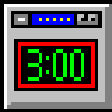
Enlarged image for Digital Timer
Digital Timer 0/1
  • Pros

    • Countdown timer counts down from a set duration.
    • Stopwatch function counts up continuously.
    • Optional WAV file playback on timer expiry.
    • Compact desktop footprint.
    • Configurable sound playback options.
  • Cons

    • Lacks advanced features like recurring alarms.
    • No support for specific file formats beyond WAV.
    • Limited customization options for interface.

Used Digital Timer for Windows?


Explore More


Full Specifications

GENERAL
Release
Latest update
Version
1.4
OPERATING SYSTEMS
Platform
Windows
Operating System
  • Windows 10
  • Windows XP
  • Windows 2003
  • Windows Vista
Additional Requirements
None
POPULARITY
Total Downloads
6,658
Downloads Last Week
0

Report Software

Program available in other languages


Last Updated


User Reviews

2.7/5

3 User Votes


Developer’s Description

Add a countdown utility to your desktop and play a WAV file when the timer expires.
Digital Timer is a useful tool for measuring time durations - for example, if you want to measure how long it takes for a program to run. Digital Timer offers these features:Countdown timer - counts down (like a microwave oven timer) from some HH:MM:SS value to zero. Stopwatch--continuously counts up until stopped. Play a wav file--when the countdown timer expires, Digital Timer will optionally play a wav file. Compact size--takes very little space on the desktop. Play once/Play until stopped--play the sound only once, or play it continuously (every 30 seconds) until the Stop button is clicked.

Download.com
Your review for Digital Timer