Used CalcTape for Windows?
Editors’ Review
CalcTape offers a fresh, structured approach to desktop calculation, moving beyond traditional interfaces. Designed for users tackling extensive arithmetic on PCs, it aims for transparency and easy management of complex tasks. This way, users can easily solve equations without any possible hassle.
Top Recommended Alternative

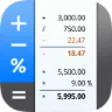
CalcTape excels by making the entire arithmetic process visible. This allows for clear oversight and the generation of crucial interim results, significantly reducing errors and improving overall calculation efficiency, particularly for complex and multi-step financial or scientific computations where accuracy is paramount. This transparency allows users to track every operation. The app offers a free version.
CalcTape excels in clarity, even with extensive calculations, functioning much like an advanced adding machine. Its dynamic recalculation, refreshing the entire process upon any term alteration, is transformative. This allows easy error correction and scenario testing without tedious re-entry, greatly streamlining workflows for enhanced accuracy. This adaptability fosters confident experimentation with diverse financial or scientific scenarios, ensuring that users can iterate on their calculations quickly and efficiently.
Streamlined calculations with its unique features
In addition, the commenting function adds invaluable context, turning complex numbers into understandable records. Saving calculations as templates is also practical for repetitive tasks. However, core advanced functionalities such as variables, parentheses, and trigonometry are exclusively Pro and Enterprise features. Users needing sophisticated mathematical tools will find the basic version restrictive, potentially necessitating an upgrade to access these essential capabilities.
This program handles basic arithmetic, exponentials, and percentages proficiently. Programmable buttons offer useful shortcuts for frequent operations like tax calculations. However, the standard edition’s feature set feels noticeably constrained compared to the richer offerings of the paid tiers. Features like an auto-saving scratchpad, side-by-side comparisons, and unlimited programmable keys are not present in the free, basic version. You would need to upgrade to access these robust tools.
Pros
- Visible arithmetic process for clarity
- Dynamic recalculation upon changes
- Ability to comment on calculation terms
- Save and use calculations as templates
Cons
- Free version's feature set is very limited
Bottom Line
An innovative tool for clear arithmetic
In conclusion, CalcTape offers an innovative, user-friendly Windows solution, prioritizing calculation clarity and correction, suiting your basic needs. Its transparent arithmetic process and easy modification capabilities make it highly effective for minimizing errors and boosting productivity. While the free version provides solid basic functionality, its full advanced power, particularly in advanced features, is reserved for its Pro and Enterprise counterparts.
What’s new in version 6.0.8
- Theming and interface revisions, bug fixes, and improved stability







.png)







